An SEO dashboard is one page that shows whether your search work is paying off, from Google clicks and rankings to the pages Google won’t index and what to fix next. The ContextBolt SEO Dashboard is one that fills itself with the research you already run in Claude, Cursor or Codex.
The other routes are a free Data Studio template (Google called it Looker Studio until April 2026), a client reporting app such as AgencyAnalytics or DashThis, or the dashboard inside a suite like Ahrefs or Semrush.
- ContextBolt SEO is the pick if you do your own SEO in an AI agent. Its SEO Dashboard fills itself with the research you run in Claude, Cursor or Codex, beside your Search Console numbers. Free for 7 days, then $35 a month.
- Data Studio is the free route. Google’s own Search Console template gets you started, and you build and maintain the rest.
- AgencyAnalytics and DashThis send clients branded reports. AgencyAnalytics is $20 per client a month, billed annually. DashThis starts at $54 a month for 3 dashboards.
- Ahrefs and Semrush put a dashboard on top of projects you set up. Ahrefs Lite, which includes it, is $129 a month.
- Track a short list. Clicks, impressions, click-through rate and average position, plus indexing, links, AI answers and next actions.
What should an SEO dashboard show?
Every tile should help answer one of three questions: is search traffic growing, what is holding pages back, and what should you work on next.
| Tile | What it tells you | Where it comes from |
|---|---|---|
| Clicks | How often searchers clicked through to you | Search Console |
| Impressions | How often you appeared in results | Search Console |
| Click-through rate | Whether searchers pick you when they see you | Search Console |
| Average position | Roughly where you rank | Search Console |
| Organic conversions | Whether search visits become signups or sales | Google Analytics |
| Pages not indexed | Pages Google left out, and the reason | Search Console |
| Target keyword rankings | Progress on the searches you chose | A rank tracker or a live check |
| Referring domains | Who links to you, and to your rivals | A backlink tool |
| AI answer mentions | Whether ChatGPT and Google’s AI name you | An AI visibility tool |
| Next actions | What to fix or write this week | Keyword and competitor research |
The first four tiles come straight from Google. In its Performance report help, Google defines a click as “the number of times a user clicked your site from Google Search results” and average position as “the average position of the topmost result from your site.” The newest data can be preliminary and change over the next few hours, so judge trends over weeks.
Pages not indexed earn a tile because a page Google leaves out can’t rank. When Search Console emails you about a new reason preventing your pages from being indexed, most of the reasons it names are fine, and that triage guide says which ones need a fix today. To test one page, our free Google index checker reads its robots.txt, redirects, noindex rules and canonical, and names the Search Console status they cause.
Rankings are where dashboards get expensive. A rank tracker checks a fixed keyword list on a schedule, and the price grows with the list. AgencyAnalytics, for example, sells its tracker in blocks of 500 keywords. If you only need to know where a page stands while you work on it, you can track keyword rankings with AI from your Search Console data and a live check of the results page.
The last row needs research. Clicks and positions say what happened. Keyword ideas with difficulty, a competitor’s top pages and a link gap say what to do next. Before a keyword earns a place on your list, run it through our free keyword difficulty checker.
An SEO dashboard template you can copy
This layout fits one screen, in any tool from Data Studio to a spreadsheet. Five rows, top to bottom.
- Scorecards: clicks, impressions, click-through rate and average position for the last 28 days, each against the 28 days before.
- Trend: daily clicks for the last 90 days, so a drop shows up as a shape you can date.
- Tables: top queries and top pages with clicks, impressions, click-through rate and position. Sort queries by impressions to find searches you appear for and rarely win.
- Health strip: pages not indexed, new and lost referring domains, and whether AI answers named you this month.
- Next actions: up to three things to fix or write, each with its evidence beside it. Our SEO action plan template shows how to pick them from Search Console and date each one.
If you call it an SEO KPI dashboard, the KPIs are row 1 plus organic conversions from Google Analytics. Everything below explains them. Keep it to numbers that change what you do, checked on a set day each week, or it turns into a tab you skip.
The same template makes three different SEO dashboard examples, depending on who reads it.
- A founder doing their own SEO needs rows 1, 3 and 5. The trend and the health strip can wait until a number moves.
- An agency keeps one copy per client, with organic conversions in row 1, the client’s logo on top and a monthly send.
- An in-house team splits row 1 into brand and non-brand clicks, so growth on your own name can’t hide a slide everywhere else.
How to build one in Data Studio
A Looker Studio SEO dashboard is now a Data Studio one. Google renamed the product back in April 2026 and says existing reports carry over with no action on your part. Building one from Google’s own template takes five steps.
- Open datastudio.google.com, go to the Template Gallery and pick a Search Console template built by Google.
- Click Use my own data and connect your Search Console property. Use the same Google account you use in Search Console, with at least view permission on the property.
- Choose Site Impression for site totals or URL Impression for page-level numbers. A data source holds one of the two, so add a second source if you want both.
- Add Google Analytics as another source for conversions.
- Share the report with whoever needs it.
Building and sharing it costs nothing. It draws only the data you connect, and Google holds some queries back to protect user privacy.
The 6 best SEO dashboard tools in 2026
ContextBolt is ours, so weigh the bias. We read every pricing page below on October 31, 2026, and ranked this SEO dashboard software by how much of the dashboard fills itself and what that costs. Prices are in US dollars, except where Semrush’s page wouldn’t show them.
| Tool | Best for | Price | What fills it | Where you use it |
|---|---|---|---|---|
| 1. ContextBolt SEO | Doing your own SEO in an AI agent | Free 7 days, then $35/mo | Your agent’s research, plus Search Console | Claude, Cursor or Codex, plus the dashboard |
| 2. Data Studio | A free report you build and share | Free, Pro $9 per user per project/mo | Data you connect | Google’s web app |
| 3. AgencyAnalytics | White-label client portals | $20 per client/mo, billed annually | 90+ integrations | Web app, client portal, MCP |
| 4. DashThis | Branded reports sent on a schedule | $54/mo for 3 dashboards, $44 yearly | SEO tools you connect, plus CSV | Web app, link, PDF, email |
| 5. Ahrefs | Scheduled tracking in a suite | Lite $129/mo | Projects you set up | Ahrefs web app, MCP |
| 6. Semrush | Teams already running Semrush | Set by region | A project’s tools | Semrush web app |
Prices from each vendor’s own pricing page, read October 31, 2026.
1. ContextBolt SEO
Best for doing your own SEO in an AI agentContextBolt SEO puts keyword, competitor, backlink, site audit and AI brand research inside the AI agent you already use, through one hosted SEO MCP server. Its SEO Dashboard is where that research is kept. Ask your agent in Claude, Cursor or Codex and the answer comes back in the chat. It also lands in your research library, dated, with the evidence.
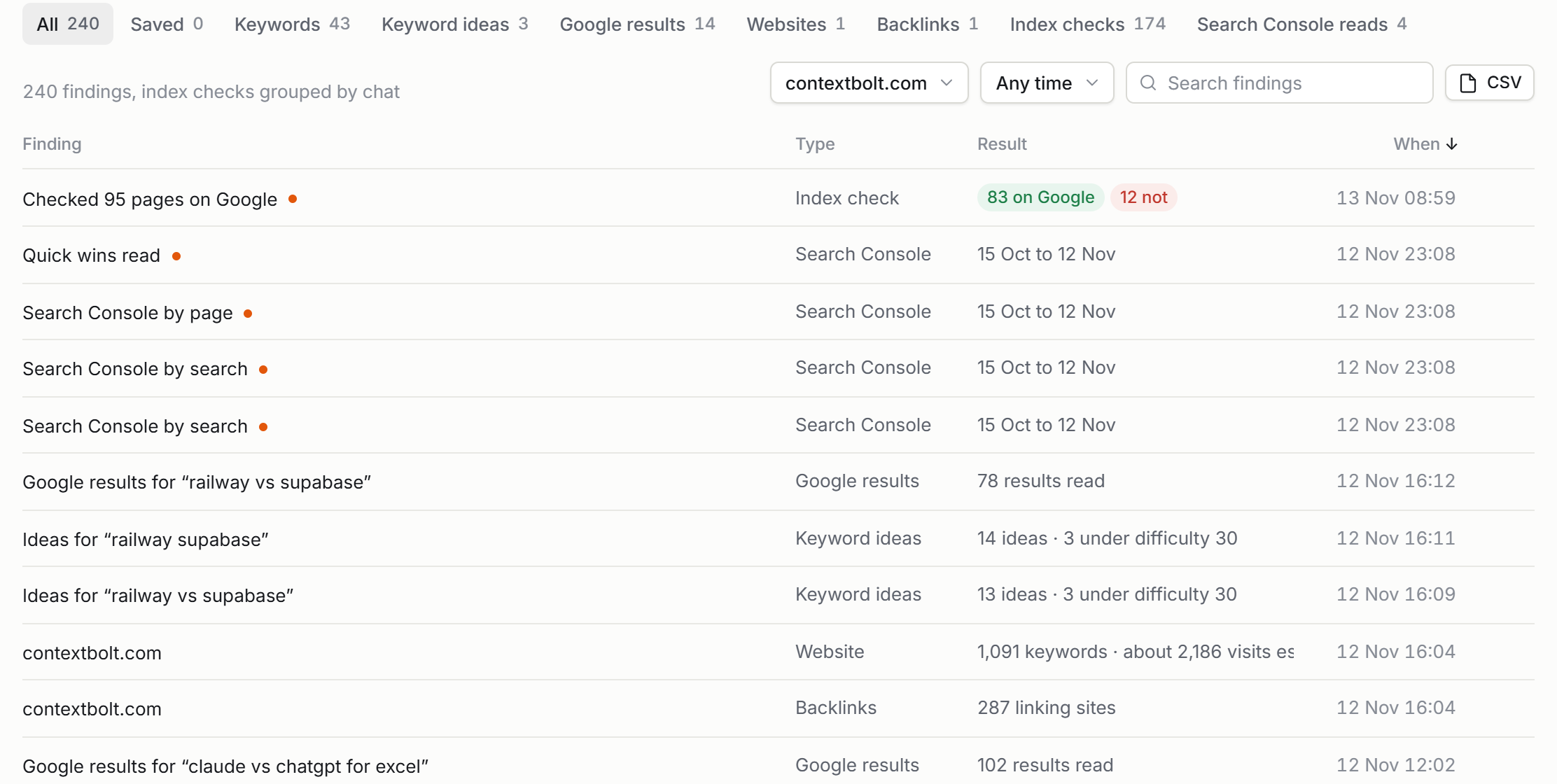
The research library in the SEO Dashboard. Every lookup your agent runs lands here, dated, and filters by type, date and website. Click around the demo dashboard.
It is an online SEO dashboard at seo.contextbolt.app, private to the email on your account. You filter the library by type, date or website, star what matters and download what you see as a CSV, at no credit cost.
When a box is quicker than a sentence, you run research from the page, and the Run button shows the credits before anything runs. Keyword ideas come with searches, difficulty and intent, competitor pages show a site’s estimated visits and the keywords it ranks for, and backlink pages show referring domains, spam score and which links pass ranking credit.
Connect Search Console once and you see clicks, impressions, average position and click-through rate for 7, 28 or 90 days, against the period before. If you run several sites on that Google account, you switch between them at the top of the sidebar. For setup in Devin Desktop (formerly Windsurf), Gemini CLI, VS Code and more, see the AI agents it works in.
Pricing: 7-day free trial with 100 credits, card required. Then $35 a month for 1,000 credits, the same credits from the agent or the dashboard. The dashboard is included.
Verdict: the pick if you already work in an AI agent, because the research you run becomes the dashboard. There is nothing to build and nothing to feed by hand.
ContextBolt SEO vs Ahrefs, side by side.
| ContextBolt SEO | Ahrefs | |
|---|---|---|
| Price | $35/mo after a 7-day trial | Lite $129/mo, 1 user |
| What fills the dashboard | Every lookup your agent runs | Projects you set up |
| Where you use it | Claude, Cursor or Codex, plus the dashboard | The Ahrefs web app, plus MCP |
| Rank tracking | When you ask | 750 keywords on Lite, updated weekly |
| Backlink data | Referring domains, gaps and overview | Ahrefs’ own index |
What you gain is $94 a month and a dashboard that fills from the questions you ask. Ahrefs keeps its own index and scheduled rank tracking for teams that run on them.
Head to head ContextBolt SEO vs Ahrefs Every row of that table and more, with the jobs where Ahrefs is still the better buy. Read the comparison2. Data Studio (formerly Looker Studio)
Best free report builderData Studio is Google’s free report builder. If you have used a Looker Studio SEO dashboard template, this is the same product under its original name, which Google brought back in April 2026. Its Template Gallery includes templates built by Google for Search Console and Google Analytics.
Creators and viewers pay nothing. Data Studio Pro is $9 per user per project a month and adds team content management and Google Cloud support. Keyword and backlink data from outside Google has to come from another tool, through a connector or a spreadsheet. Ahrefs, for one, lists its Looker Studio integration on its $449 Advanced plan.
- Free, from Google
- Google-built Search Console template
- Reports you can share
- You build it and keep it working
- Shows only the data you connect
- Some queries withheld for privacy
Pricing: free. Pro is $9 per user per project a month.
Verdict: the right free start for a report you share. It shows what happened in the data you connect, so keyword ideas, a competitor’s traffic and who links to them still need research, which ContextBolt SEO saves to its dashboard as you ask.
3. AgencyAnalytics
Best for white-label client portalsAgencyAnalytics is a client reporting web app for agencies. Each client gets unlimited dashboards and reports from 90+ integrations under your logo, colors and domain, with a client portal and unlimited staff and client users. Reports can run on a schedule, with an approval step before they go out.
Core is $20 per client a month, billed annually, and the page says paying annually saves 20%. The 14-day trial needs no card. Its SEO tools include a site auditor, backlink monitoring and a daily rank tracker, which is an add-on at $41.67 a month per 500 keywords, billed annually. Its MCP server lets Claude or ChatGPT answer questions about one client’s connected data at a time.
- White-label portal, domain and email
- Scheduled reports with approvals
- Unlimited client and staff users
- The bill grows with every client
- Rank tracking is an add-on
- Keyword research is not on its SEO tools list
Pricing: Core $20 per client a month, billed annually. 14-day free trial, no card.
Verdict: a good fit when clients expect a portal of their own. Its SEO tools track and report, and its SEO tools page lists no keyword research, so the research that decides the next page still happens somewhere else, such as your AI agent with ContextBolt SEO.
4. DashThis
Best for scheduled branded reportsDashThis is a reporting web app priced by the number of dashboards. One dashboard is one report, and DashThis says users usually make one per client. Its SEO dashboard template pulls Search Console and Google Analytics 4, plus Semrush, Ahrefs or Moz for rankings and links, and CSV uploads cover anything else.
Individual is $54 a month for 3 dashboards and 15 sources, or $44 a month paid yearly. Professional is $164 a month for 10 dashboards, or $139 paid yearly. Every plan includes white label, a custom domain, link sharing, PDF export and scheduled emails, and the 14-day trial gives you 10 dashboards. Its pricing page also lists an MCP connector for Claude and ChatGPT.
- Simple pricing by dashboard
- White label on every plan
- Scheduled emails, links and PDFs
- 3 dashboards on Individual
- SEO data comes from tools you pay for separately
- Priority support starts on Business
Pricing: Individual $54 a month, or $44 a month paid yearly.
Verdict: a clean way to send reports. The SEO numbers come from the tools you connect, so the keyword and competitor research behind them is a separate bill, and ContextBolt SEO covers that research for $35 a month with its own dashboard.
5. Ahrefs
Best for scheduled tracking in a suiteAhrefs’ Dashboard gives “a high-level view of all your websites” inside its suite. You can track an unlimited number of projects as long as you verify you own them, sort them into folders and set how often each one emails you alerts. Report Builder turns project data into reports.
The Dashboard comes with Lite, at $129 a month for one user, with 750 tracked keywords updated weekly. Standard is $249 and Advanced $449, and Ahrefs says paying annually saves up to 17%. Lite’s Report Builder holds 5 reports, and a $99-a-month add-on raises that to 50, with scheduling. MCP and API access come with Lite.
- Ahrefs’ own index and metrics
- Unlimited verified projects
- MCP and API access on Lite
- $129 a month for one user
- Rank Tracker updates weekly
- More reports cost $99 a month
Pricing: Lite $129 a month, Standard $249, Advanced $449.
Verdict: a deep suite with a dashboard on top. If the research and a record of it are what you need, ContextBolt SEO covers keywords, competitors, backlinks and audits for $94 a month less, and its dashboard fills from the questions you ask.
6. Semrush
Best if you already run SemrushSemrush’s SEO Dashboard “pulls the most relevant data from your project into a single view.” It shows organic traffic, Authority Score, AI visibility, mentions and site health, then widgets for Position Tracking, Site Audit, competitors and Backlink Audit. A Google Data tab adds Search Console clicks, impressions, CTR and position, and visits from Google Analytics.
It starts from a project. Ranking and audit widgets appear once you create those campaigns, and each widget refreshes on its own tool’s schedule. Scheduled PDF reports and white-labeling are paid report add-ons. Semrush sets prices by region, and its pricing page showed us euros on October 31, so we have not quoted a US price for its entry SEO plan. Its help center lists Semrush One plans from $199 a month, and there is a 7-day free trial.
- Search Console and Analytics beside Semrush data
- AI visibility on the same screen
- A full suite behind every widget
- Needs a project and campaigns first
- Widgets refresh on different schedules
- Branded reports cost extra
Pricing: set by region. Semrush One from $199 a month, per Semrush’s help center.
Verdict: open it first if you already pay for Semrush. If you are choosing a dashboard from scratch, ContextBolt SEO’s fills itself from the questions you ask, with no campaigns to set up, for $35 a month.
Head to head ContextBolt SEO vs Semrush Choosing from scratch? Plans, data and workflow compared, and the teams that should stay on Semrush. Read the comparisonHow to choose an SEO dashboard tool
Start with who reads it and how often.
- You do your own SEO and work in an AI agent: ContextBolt SEO. The research you run fills the dashboard, with Search Console beside it.
- You want it free and can build it: Data Studio, starting from Google’s Search Console template.
- You owe clients a branded report: AgencyAnalytics when clients want a portal of their own, DashThis when a set number of dashboards fits your client list.
- Your team already pays for a suite: open the dashboard in Ahrefs or Semrush before buying anything new.
One scope note on ours. The SEO Dashboard is private to the email on your account, with no share link and no teammate or client logins, and ContextBolt SEO checks rankings when you ask rather than on a daily schedule. If clients need a login of their own, pair it with a reporting app.
Budget for the data behind any dashboard, too. DashThis, for one, displays Semrush, Ahrefs or Moz numbers that you pay for separately. Our SEO tool pricing guide compares those subscriptions side by side. And if you want a first look at where your site stands before you choose, run the free site check on your homepage. It’s free and needs no account.