A keyword research MCP is a server that hands your AI agent live keyword data as tools it can call: search volume, keyword difficulty, related keyword ideas and the current Google top 10. You connect it once to Claude, Cursor or Codex, then ask “which of these 30 phrases can I rank for?” and the agent looks the numbers up instead of guessing them.
MCP, the Model Context Protocol, is the open standard that lets an assistant use another product’s tools. If the term is new, our plain explainer on MCP covers it without the jargon.
ContextBolt SEO is a keyword research MCP we build, so weigh the bias. On November 4, 2026 we sent it 12 phrases in one call from Claude Code. Eight came back with volume and difficulty and cost 8 credits. Four had no figure at all, including the phrase this post targets, and cost nothing.
- It gives your agent three jobs: keyword ideas from a seed, volume and difficulty for a list you already have, and who ranks for a phrase right now.
- Price it per lookup. ContextBolt SEO charges 1 credit per phrase with a figure, after a 7-day free trial. DataForSEO bills from $0.012 a request after a $50 top-up. Keywords Everywhere charges 1 credit a keyword.
- Send the list in one call. Ours takes up to 100 phrases at once, and a phrase with no figure costs nothing.
- No figure is not zero searches. “keyword research mcp” had no volume figure on November 4, yet our Search Console showed about 380 impressions for it in four weeks.
- Setup is a URL and a sign-in for the hosted servers, in Claude Desktop, Claude Code, Cursor or Codex.
What a keyword research MCP does
An MCP server publishes a short list of tools, and your agent decides when to call them. A keyword research server’s tools cover three jobs:
- Ideas from a seed: You give it “iced coffee” and get related phrases back with volume, difficulty, cost per click and intent. In ContextBolt SEO that tool is
keyword_research. - Numbers for a list: You paste 40 phrases and get volume, difficulty, trend and intent for each one. That is
keyword_difficulty, which takes up to 100 phrases in one call. - Who ranks now: The live top 10 for a phrase, with the features on the page, such as an AI Overview, videos or People Also Ask. That is
serp_overview.
The agent chains them. A typical session runs ideas first, then difficulty on the shortlist, then the top 10 for the two or three phrases worth a page. You watch it happen in the chat where it will later draft the brief, so the numbers and the writing sit in one place.
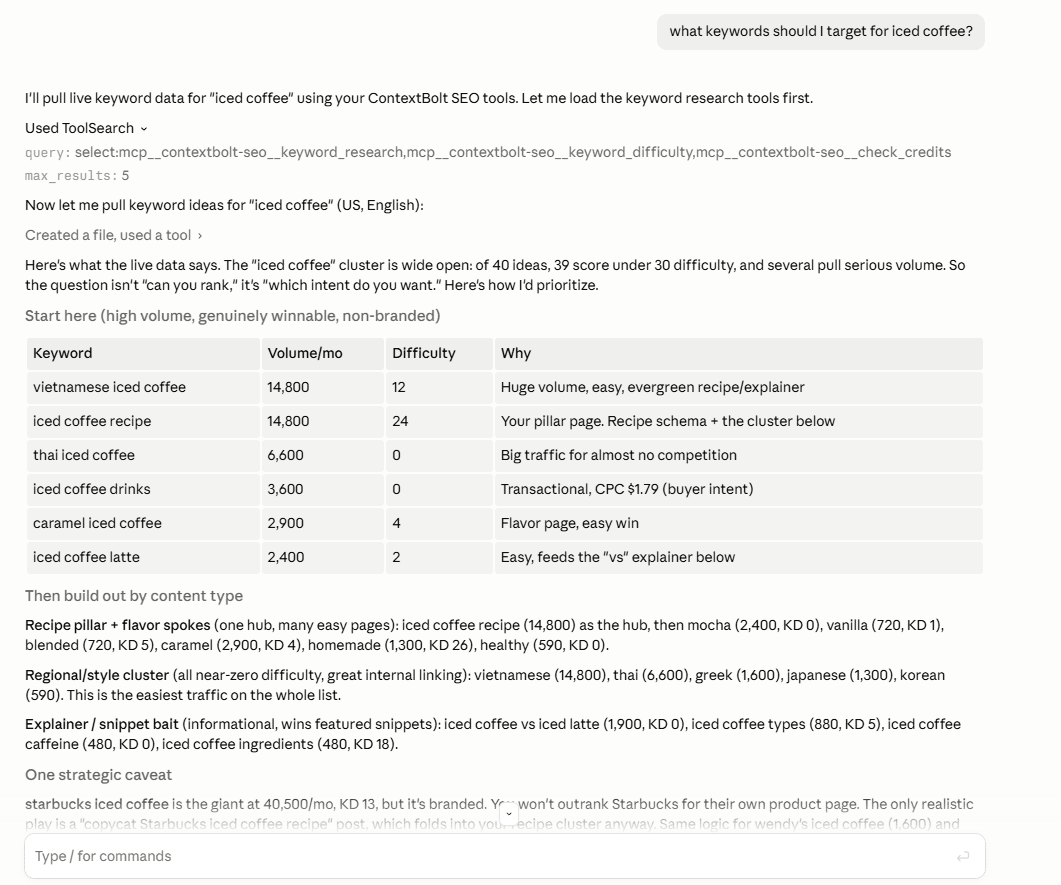
Claude calling ContextBolt SEO’s keyword tools on one seed. It pulls the ideas, then sorts them into pages you could write.
Without a server like this, an assistant has no source for search volume. Ask Claude how many people search “iced coffee recipe” and it estimates, or quotes a figure from whatever page its web search finds.
We ran 12 keywords through one call
From Claude Code on November 4, 2026, we asked ContextBolt SEO for volume and difficulty on 12 phrases around this post’s topic, United States, in a single keyword_difficulty call. This is what came back.
| Phrase | Searches a month | Difficulty | Trend, 1 year | Intent |
|---|---|---|---|---|
| dataforseo mcp | 210 | 18 | +86% | Informational |
| seo mcp | 90 | 6 | +75% | Informational |
| seo mcp server | 20 | Unscored | Flat | Navigational |
| keywords everywhere mcp | 20 | Unscored | +100% | Navigational |
| keyword research api | 50 | 10 | -90% | Commercial |
| keyword research tool | 3,600 | 81 | -64% | Commercial |
| ai keyword research tool | 170 | 68 | -66% | Commercial |
| keyword research with ai | 10 | 68 | -100% | Commercial |
| keyword research mcp | No figure, free | |||
| mcp keyword research | No figure, free | |||
| keyword research mcp server | No figure, free | |||
| claude keyword research | No figure, free | |||
The run shows how the billing and the data behave.
- The bill was 8 credits. One credit for each phrase with a figure. The four empty phrases cost nothing, so sending a long list of maybes is cheap.
- The MCP phrases are growing. “dataforseo mcp” rose 86% in a year and “seo mcp” 75%. “keyword research tool” fell 64% over the same year, and its difficulty of 81 puts it out of reach for a young site.
- It remembered. This account had checked “keyword research tool” about three months earlier, so the reply opened with the change: difficulty 83 to 81, volume 5,400 to 3,600 a month. The lookup cost its normal credit; the comparison came with it.
- Difficulty is the tool’s own score. It runs from 0 to 100, and each vendor computes its own. Compare phrases inside one tool, never a 33 from one vendor against a 33 from another.
Every result also saved itself to the account’s SEO Dashboard, so next week’s session can start from this list instead of rerunning it.
No figure is not zero searches
A keyword database holds phrases with enough measured demand to estimate. New phrases and long ones often fall below that line, and the tool then says it has no figure. ContextBolt SEO says exactly that, in words, rather than printing a 0 that looks like a fact.
Our own keyword is the example. “keyword research mcp” had no figure on November 4. In Google Search Console, October 5 to November 2 showed our site about 380 impressions for that exact phrase, spread over four pages, and no clicks. None of those pages was written for it. Google had searchers; the database had not counted them yet.
So for any new term, check Search Console before you drop it. Once you connect it, ContextBolt SEO reads your Search Console in the same chat without spending credits, which turns “no figure” into “no figure, but 380 impressions on our site”, and that is a page worth writing. If you only want to try one phrase first, our free keyword difficulty checker shows difficulty and monthly searches with no sign-up.
Keyword research MCP servers compared
We read each vendor’s own MCP and pricing pages on November 4, 2026. Prices are in US dollars where the vendor shows them.
| Server | Keyword data | How you get it | What a lookup costs |
|---|---|---|---|
| ContextBolt SEO | Ideas, volume and difficulty for up to 100 phrases a call, the live top 10, your Search Console | Hosted URL and sign-in | 7-day free trial, then 1 credit a phrase with a figure, 1,000 credits for $35 a month |
| DataForSEO MCP | Any DataForSEO endpoint, including Labs keyword ideas and Google Ads volume | Hosted URL and sign-in, or local with your API login | $0.012 a Labs request plus $0.00012 a row; $50 minimum top-up |
| Keywords Everywhere | Volume, cost per click, competition and 12-month trend; related and site keywords | Hosted URL, sign-in or API key | 1 credit a keyword; $80 buys 200,000 credits |
| Keyword Tool | Suggestions and volume for Google, Bing and Microsoft Copilot | Hosted URL and sign-in to a Pro plan, or a guest endpoint | Pro plans share 50 to 400 requests a day across web, API and MCP |
| CalmSEO | Google Ads volume for up to 1,000 keywords a call, ideas, ranked keywords, top 10 | Hosted URL and sign-in | 15 credits a volume call; $10 for 300 credits |
| Mangools (beta) | KWFinder keywords with volume, cost per click and difficulty, plus SERP and rank tracking | Hosted URL, sign-in or API token | Draws on your Mangools plan’s API quota |
| Semrush MCP | Semrush keyword and domain reports | On Semrush One, SEO Classic or Trends API plans | API units: 50,000 on entry plans; many reports charge per row |
| Ahrefs MCP | Ahrefs keyword and site data | On Lite, Standard, Advanced or Enterprise plans | Plans list API units: 200,000 a month on Lite |
ContextBolt SEO is first because it covers all three jobs on one plan, and the agent gets answers it can read rather than raw API rows. Every lookup saves to a private dashboard, and a repeat lookup tells you what moved since last time. It sits on DataForSEO’s data. The trial runs 7 days with 100 credits, card required. The setup guide shows each client in a minute.
DataForSEO’s server is the raw layer. Its product page lists a hosted endpoint at https://mcp.dataforseo.com/v3/mcp with OAuth, plus a local npx package that takes your API login and password. The README describes general tools, among them documentation search and an api_request call, so your agent picks the endpoint and pays its price. Labs requests are $0.012 each plus $0.00012 a row, and the Live Google Ads volume endpoint is $0.09 a task for up to 1,000 keywords. The whole bill is in our DataForSEO MCP pricing breakdown.
Keywords Everywhere runs an official server at https://mcp.keywordseverywhere.com/mcp, per its MCP page, and its pricing page says “One credit gets you the volume, cpc, competition & 12 month trend data for one keyword.” Credit packs start at $80 for 200,000 and expire after a year; yearly plans start at $7 a month. A GitHub server with the same name, mcp-keywords-everywhere, says in its README that it is not official.
Keyword Tool has a hosted server at https://mcp.keywordtool.io for its Pro plans, and a free guest endpoint at https://mcp.keywordtool.io/guest with Google and Bing suggestions and volume for the first five keywords, per its MCP page.
CalmSEO lists its tools with a credit price each on its keyword research MCP page. Plans run from a free account with 30 credits to start up to $79 a month, and unused credits expire each cycle.
Mangools says its MCP server is “currently in beta”, with KWFinder, SERPChecker and rank tracking inside, per mangools.com/mcp. Plan prices are in our Mangools MCP pricing post.
Semrush and Ahrefs include MCP access on their paid plans. Semrush’s knowledge base puts 50,000 MCP API units on its entry plans, and its developer docs charge many reports per line returned. Ahrefs offers MCP on Lite, Standard, Advanced and Enterprise, and lists 200,000 API units a month on Lite. Which plan you need is in Semrush MCP pricing and Ahrefs MCP pricing.
One more you will meet in search: Keywords People Use runs an MCP server for question research (People Also Ask, autocomplete, Reddit and Quora), and its pricing page lists API access from $15 a month.
How to connect a keyword research MCP
Hosted servers all connect the same way, with a URL and then a sign-in. These are the lines for ContextBolt SEO, from our setup page.
- Start the trial. Open ContextBolt SEO and start the 7-day free trial. The server URL is
https://seo.contextbolt.app/mcpfor every account. - Add it to your agent. Pick your client below.
- Sign in. Approve the connection in the browser window that opens.
- Check it worked. Ask “how many SEO credits do I have left?” The credit check is free and proves the connection.
Claude Code:
claude mcp add --transport http contextbolt-seo https://seo.contextbolt.app/mcpThen run /mcp and choose Authenticate.
Claude Desktop: open Customize, then Connectors, then +, then Add custom connector. Paste the URL, leave the options Claude fills in as they are, and sign in.
Cursor: add the server to mcp.json, then click Authenticate.
{
  "mcpServers": {
    "contextbolt-seo": {
      "url": "https://seo.contextbolt.app/mcp"
    }
  }
}
Codex:
codex mcp add contextbolt-seo --url https://seo.contextbolt.app/mcp
codex mcp login contextbolt-seo
The other hosted servers swap in their own URL. Mangools, for example, documents claude mcp add --transport http mangools https://mcp.mangools.com/mcp and the same /mcp sign-in.
Prompts that get usable answers
The server only supplies tools. The prompt decides whether the agent spends one credit or forty, so ask for the shape of answer you want.
- Batch your list. “Check volume and difficulty for these 40 phrases in the US, in one call, and sort them by searches.” One call, one table, and the empty ones are free.
- Chain the jobs. “Find keyword ideas for meal prep containers, check difficulty on the 10 with the most searches, then show me who ranks for the best three.” That is three tools in order, and you only pay for the top 10 on the phrases that survived.
- Ask Search Console first. “Which of these phrases already get impressions on my site?” It costs no credits and catches the phrases a database has not counted yet.
- Check again later. “Look up keyword research tool again.” A repeat lookup leads with what changed since the last one.
For the full routine from seed to brief, keyword research with Claude walks through it step by step, and the same prompts work in Cursor and Codex.
Which keyword research MCP to pick
Find your situation, then read across.
| Your situation | Pick |
|---|---|
| You do your own SEO in Claude, Cursor or Codex and want ideas, difficulty and the top 10 on one plan | ContextBolt SEO |
| You want your research saved and compared over time, with Search Console in the same chat | ContextBolt SEO |
| You are a developer who wants every raw endpoint and will manage a prepaid balance | DataForSEO MCP |
| You already pay for Semrush or Ahrefs on a plan with MCP access | Their own server, inside your plan’s units |
| You want the questions people ask more than the volumes | Keywords People Use |
ContextBolt SEO is built for the research around a page you are about to write: ideas, difficulty, who ranks, and what your own site already shows for the phrase. It does not track daily rankings or cluster keywords. If your job is raw volume for tens of thousands of phrases a month, a per-keyword credit costs less per phrase.
For everyone else, start the 7-day free trial of ContextBolt SEO, connect it with the line for your client above, and paste the list of phrases you were about to guess at. Ask which ones you can rank for.