Codex stopped you mid-task and you want to know when it comes back. On a ChatGPT plan, Codex runs on two clocks: a five-hour window that starts with your first message, and a weekly period. Each resets on its own schedule, and the Usage page in ChatGPT shows both times.
A reset can also move your week. Buy an instant reset on Tuesday, send your next request on Wednesday morning, and your week now runs Wednesday morning to Wednesday morning.
We read OpenAI’s three help articles on resets, its Codex pricing page, its changelog and its forum on November 17, 2026, and put every reset rule in one table. From the same pages we listed the plan-wide resets OpenAI recorded: five since June. ContextBolt makes Context Board, whose AI usage widget keeps both Codex reset times on screen, so weigh the bias.
- Five-hour window: starts with your first message after the last window ends, and resets five hours later. Pro plans have no five-hour limit right now.
- Weekly limit: resets at the time in your Usage settings. After a bought reset, the new week starts at your next request and refreshes 7 days later.
- Where to see it: Settings, then Usage and billing in the ChatGPT desktop app, or chatgpt.com/codex/settings/usage. Context Board keeps both times in sight beside Claude Code.
- Will it reset today? Only your own schedule is predictable. OpenAI’s pages record five plan-wide resets since June 2026, and OpenAI says free resets have no guaranteed schedule.
- Banked or bought: a banked reset waits in your account until you use it. A bought one applies at once, even with usage left, and pulls next week’s allowance forward.
When does Codex reset?
The five-hour window doesn’t roll minute by minute. OpenAI’s GPT-6 Astra usage guide says “a new window starts when you send your first message in Work or Codex after the previous window ends.” Where both limits apply, “you need allowance remaining in both to continue,” and you can hit the five-hour limit before five hours pass.
The week works differently. Your Usage settings show its next refresh, and OpenAI’s resets article says to check that time “rather than calculating it,” because resets move it. These are the rules from OpenAI’s pages, in one place.
| Rule | What OpenAI says | Plans |
|---|---|---|
| Five-hour window | Starts with your first message after the previous window ends. Can run out before five hours pass. | Plus, Business Standard. Pro 100, 200 and 500 have none right now. |
| Weekly period | Refreshes at the time in Usage settings. A reset that restarts it replaces the old date. | Plus, Pro, Business Standard |
| Monthly allowance | Go’s main allowance. A banked reset restores it. | Go |
| Banked reset | Saved until it expires. Restores each covered allowance below 100% to 100%. Usable once one is under 80% remaining. | Five-hour and week on Plus and Business Standard, week on Pro, month on Go |
| Automatic reset | Applied by OpenAI to the accounts and limits in an offer. Not saved, and not shown in reset History. | Chosen per offer. “Global” doesn’t mean every account. |
| Bought instant reset | Restores the five-hour and weekly allowances at once. The new week starts at your next request, and the next weekly refresh is 7 days after it. | Eligible Plus and Pro personal accounts. Not Free, Go, Business, Enterprise or Edu. |
| Flexible pricing | No fixed rate limits. Usage scales with credits. | Enterprise and Edu on flexible pricing |
| Support | No manual or courtesy promotional resets, and no extended expiry dates. | All plans |
None of these resets raises your plan’s limits. OpenAI says one-time resets “do not permanently increase your plan’s limits or add usage credits.” For how much each plan gets in a window, see Codex usage limits by plan.
Codex reset time: a worked example
Say you’re on Plus, you bought an instant reset on Sunday night, and your first Codex message after it goes out at 9:12 a.m. on Monday. By OpenAI’s rules, each clock then moves like this.
| When | What happens | The rule behind it |
|---|---|---|
| Mon 9:12 a.m. | Your first message opens a five-hour window and a new weekly period. | After a bought reset, the week starts with your first request. |
| Mon 11:40 a.m. | A big refactor uses up the window. Codex stops with most of the week left. | The five-hour limit can run out before five hours pass. |
| Mon 2:12 p.m. | The window ends. Nothing new starts yet. | A window opens only when you send a message. |
| Mon 4:05 p.m. | You send again, and a new window runs to 9:05 p.m. | First message after the previous window ends. |
| Next Mon 9:12 a.m. | The weekly allowance refreshes. | 7 days after the first request following the reset. |
Use another reset mid-week and the week restarts again from your next request. Before a new period starts, OpenAI says the time it shows “may be an estimate and can change,” so the Usage page beats your own sums.
The two windows can also end at different times. OpenAI’s own example is a week that ends at noon while the current five-hour window runs to 3 p.m. Come back at 1 p.m. and you can have 100% of the week and 10% of the window.
How to see your Codex reset time
- Open Usage settings. In the ChatGPT desktop app, go to Settings, then Usage and billing. On the web, open chatgpt.com/codex/settings/usage. Each limit shows what’s left and when it resets.
- Type
/statusin the Codex CLI. It shows your remaining limits during a session. Our guide on how to check Codex usage walks through/status,/usageand the web page. - Add the iPhone widget. OpenAI’s changelog lists Home Screen and Lock Screen widgets that track remaining usage and reset times, added to the ChatGPT iPhone app on October 2, 2026.
- Check without opening Codex. Our free Codex usage checker reads the newest limits Codex saved in your sessions folder and shows when each resets. It runs in your browser and uploads nothing.
Banked resets you received or used in the past 30 days are under History, in the desktop app’s Usage and billing settings. Bought and automatic resets don’t appear there, and the mobile app has no reset controls.
Will Codex reset today?
Your own refresh runs on a schedule, and the Usage page shows it. A plan-wide reset is OpenAI’s call. Its resets article calls free banked and automatic resets “discretionary promotional benefits, with no guaranteed availability or schedule.”
These are the plan-wide resets OpenAI recorded on its own pages, read on November 17, 2026.
| Date | What OpenAI gave | Who got it | Where OpenAI says so |
|---|---|---|---|
| By June 4, 2026 | A manual reset after service issues. It replaced the old period, so reset dates moved. | Paid subscribers | OpenAI Support, on the OpenAI forum |
| June 11, 2026 | Reset banking launched, with one free banked reset | Plus and Pro | Codex app 26.609 changelog |
| Sep 3, 2026 | A banked reset, during the GPT-6 Astra launch | Eligible Plus, Pro and Business, including Business Standard and Premium seats | Astra usage guide |
| Sep 4, 2026 | A second banked reset | The same plans. New accounts had to subscribe before 8 p.m. PT. | Astra usage guide |
| Sep 7, 2026 | An automatic reset, with nothing saved | Eligible Plus, Pro and Business | Astra usage guide |
The June 4 reset is the one OpenAI Support explained on its forum: “The Codex team performed a manual reset for paid subscribers following recent service issues.” A Pro user had 70% left with a reset due June 7, and woke up to 100% with the next reset on June 11. The banking launch is in OpenAI’s ChatGPT and Codex changelog, and the September resets are in the Astra usage guide linked above.
More were announced on X, such as April 28 and August 8, 2026, and 14 of the 28 days in October’s run after DevDay brought a reset, by our count of a community moderator’s list on OpenAI’s forum. OpenAI’s help pages don’t record those, so they’re out of the table.
An automatic reset leaves no History entry. It shows up only as a fuller meter and a new reset time on your Usage page.
How to use a banked Codex reset
A banked reset is a free reset saved to your account, from an OpenAI offer or a referral invite. Receiving one doesn’t refresh anything until you use it.
- Open Usage settings in the desktop app or on the web. The mobile app can’t do it.
- Pick the usage summary that shows an available reset, such as “1 reset available” or “Full reset.”
- Check what it covers and when it expires, then confirm.
In the Codex CLI, type /usage and pick Redeem reset. If your CLI version doesn’t show it, use the desktop app or the web.
It works only once something it covers is under 80% remaining. Before that, you’ll see “Your usage does not need a reset right now,” and the reset stays saved. A covered allowance already at 100% isn’t restarted, so on Plus a banked reset can restore your five-hour window without touching your week.
The desktop app can also let Codex use one for you. Turn on Allow your assistant to use resets, and you can ask Codex to redeem a banked reset once your main five-hour or weekly allowance is at 10% or less. Leave it off to keep resets in the manual controls only.
Use one late in a week with the refresh still days away. It tops each covered allowance up to 100%, so the less you have left, the more it gives back. A global reset right after it doesn’t stack: OpenAI says the two “do not add together to give you 200%.”
Should you buy an instant reset?
Eligible Plus and Pro personal accounts can buy one, per OpenAI’s paid reset article. There are two ways in: Buy an instant reset beside your usage meter in the desktop app’s Usage settings, or the offer banner that appears when you hit your weekly limit. Hitting only the five-hour limit doesn’t bring up the banner. The price shows at checkout.
Read these before you pay:
- It applies at once. OpenAI says the reset “does not wait for you to use the rest of your allowance” and can’t be saved or scheduled.
- It moves your week. The new period starts with your next request, and the next refresh is 7 days after that.
- It isn’t extra usage. It pulls your normal weekly allowance forward instead of adding a separate entitlement.
- It’s final. OpenAI says it generally doesn’t offer refunds for reset purchases.
So buy one only when the week is close to empty and the refresh is days away. With 40% of the week left, a reset still hands you one full week, and that 40% is gone. If the refresh is tomorrow, wait, or buy credits, which pay for usage once your included limits run out.
If your receipt shows the purchase but the meter didn’t move, don’t buy a second one. Refresh Usage settings on the account you charged, then contact Support with the purchase time and receipt number.
Keep your Codex reset times in sight
The Usage page answers when you ask. Context Board keeps the answer on screen while you work.
Its AI usage widget shows what is left of your Codex plan as rings that empty as you work, one for the current five-hour window and one for the week. Each says when it resets, like “resets in 1h 42m” or “resets Mon 9:00 AM.” Claude Code sits in the same widget, read the same way, so you can see which agent has room before you start a long task.
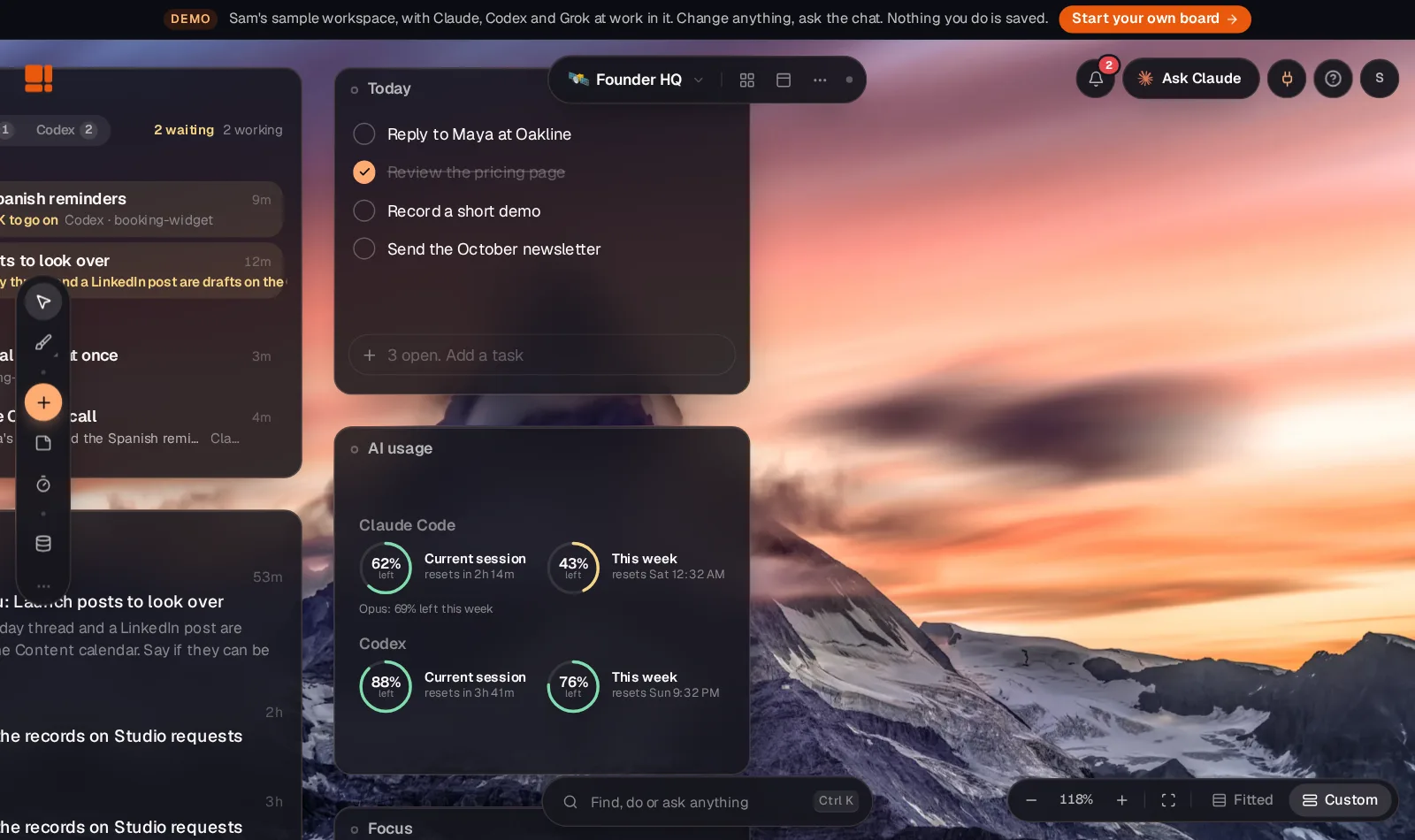
The AI usage widget on Context Board’s public demo, zoomed in. Every number is sample data.
The numbers come from Codex itself. As it works, Codex saves what OpenAI last told it about your limits, and the runner, a small program you set up once with one line from Connect, sends the board the percentages and reset times. It draws the windows Codex reports, so on Pro you see the week. Every new account starts with an Agents board that has AI usage on it, and the Claude Code usage rings come from the same runner.
Set up Codex usage on a board: free for 3 days, then $12 a month for all of Context Board.