A Claude SEO skill is a folder of instructions and scripts, built around a SKILL.md file, that teaches Claude to run an SEO job like an audit or a content brief the same way every time. It gives Claude a method, but it cannot see search volume, Google rankings or your Search Console numbers unless you connect a data source next to it.
We tested that on November 8, 2026. We installed the skill Google ranks first for “claude seo skill”, Daniel Agrici’s claude-seo (27,353 GitHub stars that day), into a clean Claude Code folder with no API keys and asked it questions we already knew the answers to. It gave no figure for any of them, and it said so instead of guessing. Then we connected ContextBolt SEO in the same folder and asked again. All three answers came back in 69 seconds for 2 credits.
ContextBolt SEO is the data side of that test and we build it, so weigh the bias. The skills themselves are free, and the audit work they do on your own pages is useful. Below: what a skill is, the main SEO skills, the test, and how to give one live data.
- What a skill is: instructions and scripts that make Claude run an SEO job one way every time, in Claude Code or the Claude apps.
- What it cannot see alone: search volume, keyword difficulty, who ranks on Google and your Search Console. With no data connection, the skill Google ranks first answered none of our data questions. ContextBolt SEO answered all three in the same Claude.
- The main skills: claude-seo (free, MIT, 26 skills), SE Ranking’s SEO Skills (data from an SE Ranking account) and InfraNodus’s seo-analysis (live Google data with a free InfraNodus account).
- Give it data with an MCP server: one URL and a sign-in adds keyword, top 10 and Search Console data. Ours is a 7-day free trial, then $35 a month.
- Read it before you install it: a skill can run code on your machine, and Anthropic says to use only skills from sources you trust.
What a Claude SEO skill is
Anthropic describes skills as “folders of instructions, scripts, and resources that Claude loads dynamically to improve performance on specialized tasks.” Each skill has a SKILL.md file with a name and a short description. Claude keeps only those descriptions in mind until a request matches one, then reads the full instructions and any scripts the skill points to.
Skills run in three places:
- Claude Code: a folder in
~/.claude/skills/works in all your projects, one in.claude/skills/works in that project, and plugins install whole packs with/plugin. - The Claude apps: zip the folder and upload it under Customize, then Skills. Code execution has to be on in Settings.
- The API: through the code execution tool.
Anthropic’s own line on how skills and data fit together: “MCP connects Claude to data; Skills teach Claude what to do with that data.” That is from its March 2026 explainer, and our Claude Skills vs MCP comparison covers the difference in full. For SEO it decides what a skill can do. A skill knows how to read a results page and turn it into a brief. Something else has to fetch the results page.
The Claude SEO skills people install
All four have a page in Google’s top 10 for “claude seo skill”. We read each one’s page or repository on November 8, 2026.
| Skill | Made by | What it does | Live data it can use | Cost |
|---|---|---|---|---|
| claude-seo | Daniel Agrici | Site and page audits, technical, schema, content quality, AI search readiness, briefs, plans | Your own keys: Google APIs, Moz, Bing; paid extensions for DataForSEO, Ahrefs, SE Ranking and more | Free, MIT; data accounts extra |
| SEO Skills | SE Ranking | Content briefs, AI search visibility, backlink gaps, ads research, saved as files | The SE Ranking MCP server | Skills free; data from an SE Ranking account |
| seo-analysis | InfraNodus | Search intent and content gaps from Google results and related searches | The InfraNodus MCP server, web search without it | Free; free InfraNodus account for live data |
| Claude SEO Skill | Alex Labat | SEO, GEO and AEO audit of a site, with a DOCX and PDF report | Reads your pages | Free |
claude-seo is the big one: one orchestrator, 25 sub-skills and 19 agents in version 2.5.0, all of which we counted in the repository. You type /seo audit and a URL, and it splits the work across agents. Its README says it “works out of the box” with no API keys, and that Google’s free APIs add field data if you set up your own Google Cloud project. It also says what you lose without them: “Core Web Vitals are lab estimates and indexing is inferred from the page.”
SE Ranking’s skills are the plainest about the split. Its page heads one section “Skills give Claude the process. SE Ranking MCP gives it the data,” and says that without the server, “Claude can still follow instructions, but it cannot use live SE Ranking data inside those workflows.”
InfraNodus does the same with its own server: without it, “the skill still runs, but on web search instead of live Google data, and it says so in the report.” Alex Labat’s skill at claudeseoskill.com only reads pages, and its FAQ sends keyword research and backlinks to Ahrefs and Semrush.
All four makers say it in their own words: live numbers come from a connected source. So what happens when you skip the data?
We tested claude-seo without data, then with it
Setup, November 8, 2026: Claude Code 2.1.311 on the Sonnet model. We copied claude-seo’s skills and agents from the repository into a fresh project’s .claude folder. No API keys, no MCP servers. Web search and page reading were on. The shell was off, so the skill’s Python scripts did not run; with no keys configured, they have no source for volume or rankings anyway.
We asked questions whose answers we could check: one about a phrase, one about Google and one about our own site.
| Question | claude-seo alone | claude-seo plus ContextBolt SEO |
|---|---|---|
| Monthly US searches and difficulty for “claude seo skill” | No figure. It sent the job to its DataForSEO agent, which had no DataForSEO tools connected. | 480 a month, difficulty 3 out of 100 |
| Google’s top five for the phrase today | No list, for the same reason | github.com (claude-seo), a Reddit r/ClaudeAI thread, claudeseoskill.com, claude-seo.md, agenticskills.io |
| Searches that showed our /blog/claude-seo/ page in 90 days | No figure. It suggested exporting a CSV from Search Console. | 120 impressions across 32 searches; the top one, “claude seo”, 15 impressions at position 27.5 |
We checked the third answer against Search Console directly, and it matched. The run with ContextBolt SEO took 69 seconds and cost 2 credits: 1 for the volume and difficulty, 1 for the top 10. Search Console uses no credits.
Then we ran the job the skill is built for. /seo content-brief claude seo skill returned a full brief in 46 seconds: search intent, a ten-section outline with word counts, a keyword plan and meta tags. It opened with a fair warning: “I had no keyword volume or difficulty data. Word counts and scores below are my estimates, not measurements.”
The weak spot was the competitor table. The skill found its five competitors through web search: studiohawk.com.au, pasqualepillitteri.it, an InfraNodus page on how skills work, wytlabs.com and skills.sh. ContextBolt SEO pulled Google’s real top 10 for the phrase in the same hour, and none of those five pages was in it. A brief built against the wrong five pages tells you to beat pages you are not competing with.
What a skill does well without data
The test is not a knock on claude-seo. It did not invent a single number, and on work that only needs your own pages, a skill alone is enough. Use this table to tell the two kinds of job apart.
| Job | Skill alone | What it needs |
|---|---|---|
| Check a page’s title, headings, images and links | Yes | The page |
| Validate or write schema markup | Yes | The page |
| Check robots.txt, the sitemap and hreflang | Yes | Your site |
| Outline a brief | The structure, yes | Google’s real top 10 for the competitor list |
| Pick which keyword to target | Guesses only | Search volume and difficulty |
| See who ranks on Google now | A different set from web search | A live Google results page |
| Find what your pages already rank for | Needs your data | Search Console |
| Measure real page speed | Lab estimates | Google’s field data |
The top four rows are the jobs claude-seo was built for, and its checklists are thorough. If you only audit pages you own, a skill alone saves you writing the checklist yourself. Our guide to a site audit with Claude shows what the same audit looks like when Claude can crawl the whole site.
The bottom four rows have a number in the answer. Those are the questions a skill cannot answer from your pages, however good its instructions are.
How to give a Claude SEO skill live data
You have three routes, and they combine.
- The skill’s own extensions. claude-seo connects to the Google APIs (Search Console, PageSpeed, Chrome UX Report, GA4) through your own Google Cloud project, free within Google’s quotas. Its DataForSEO extension is pay as you go, and our DataForSEO MCP pricing breakdown covers what a call costs. The Ahrefs extension needs an Ahrefs plan.
- The vendor’s pair. SE Ranking’s skills read from the SE Ranking server, and InfraNodus’s skill reads from the InfraNodus server. Each works best with its own account.
- An SEO MCP server next to any skill. A connected server’s tools are there in every chat, with or without a skill loaded. In our test, Claude called ContextBolt SEO’s volume, top 10 and Search Console tools on its own once the server was there.
ContextBolt SEO is built for the third route. One URL gives Claude keyword ideas, volume and difficulty for up to 100 phrases a call, the live Google top 10 and your own Search Console, plus backlink and AI visibility tools. Keyword research and the top 10 cost 1 credit each, and Search Console costs nothing. Every lookup saves to your SEO Dashboard, so next week’s session starts from this week’s numbers.
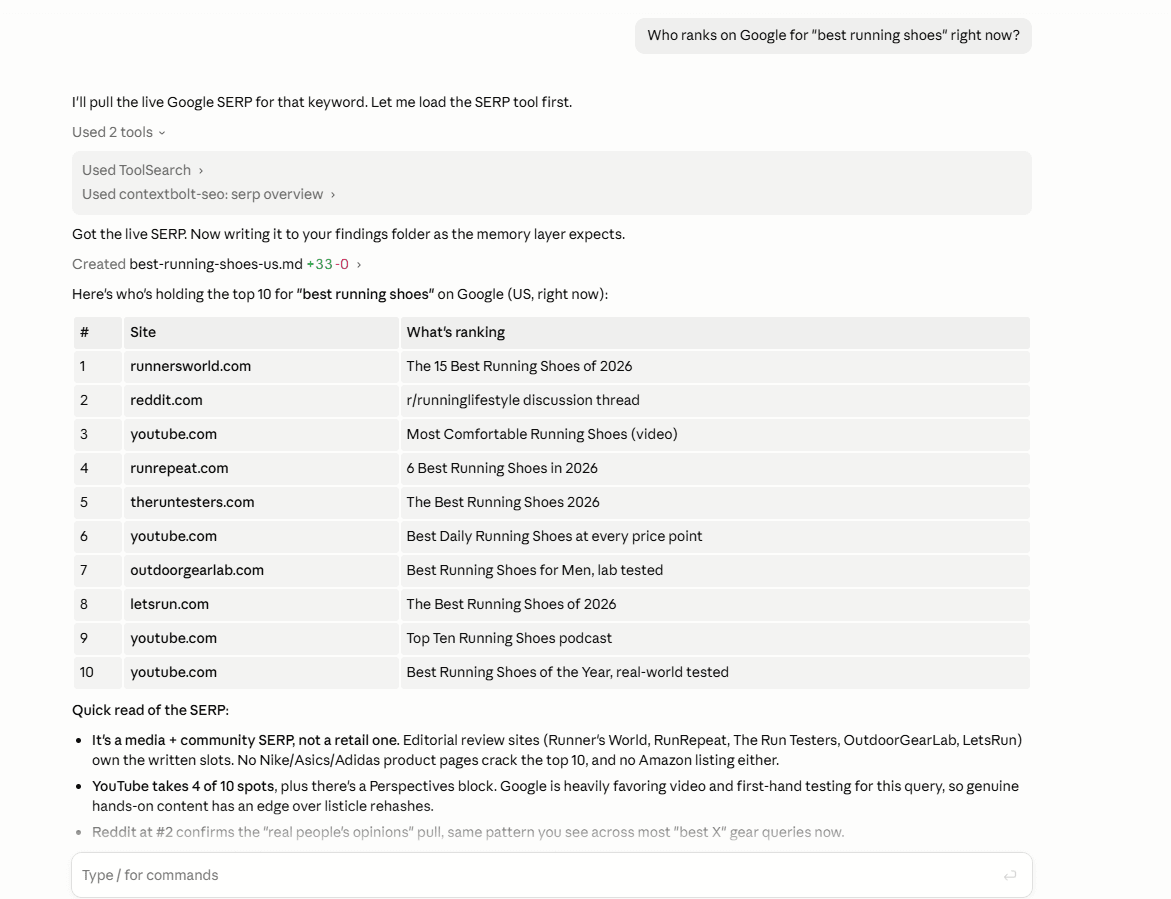
Claude calling ContextBolt SEO for a live Google top 10. This is the data a brief’s competitor table needs.
To connect it in Claude Code:
- Start the ContextBolt SEO 7-day free trial. It includes 100 credits and needs a card; after that it is $35 a month for 1,000 credits.
- Run
claude mcp add --transport http contextbolt-seo https://seo.contextbolt.app/mcpin your terminal. - Run
/mcpin Claude Code, choose Authenticate and approve the connection in your browser. - Ask a question with a number in the answer, such as “what’s the search volume for [phrase], and who ranks top five today?”
In Claude Desktop, open Customize, then Connectors, then +, then Add custom connector, and paste the same URL. The Claude Code setup guide walks through each step, and our walkthrough of keyword research with Claude shows a full session once it is connected.
Check a skill before you install it
A skill can carry scripts, and in Claude Code those scripts run with the same network access as any program on your computer. Anthropic’s advice is blunt: “Use Skills only from trusted sources: those you created yourself or obtained from Anthropic.” For a third-party SEO skill, that means a few minutes of reading first:
- Read every
SKILL.md. Look for instructions to fetch URLs you did not give it or to send data anywhere. - Read the scripts folder. claude-seo’s README asks you to download
install.shand read it before you run it. Do that. - Check
allowed-tools. Claude Code’s docs warn that a skill can grant itself broad tool access in that field. - Keep keys out of the skill. API keys belong in your environment or the data server’s sign-in, not in a folder you might share.
For our test we copied the skill folders by hand and left the shell off, so nothing from the repository ran on our server.
Which setup to pick
Use a skill alone if you audit pages you own and want the same checklist every time: titles, schema, sitemaps, content quality. claude-seo does that well for free.
Add a data source when the question has a number in the answer: which keyword to target, who ranks today, what your site already shows up for. Pick the skill maker’s own server if you already pay for that suite. Pick an SEO MCP server like ours if you want volume, the live top 10 and Search Console in one connection, with every result saved. For the bigger picture of where Claude helps with SEO and where it stops, see our Claude SEO guide.
Then run our three test questions on your own site. Start the ContextBolt SEO trial, connect Search Console, and ask Claude which searches already show your best page. That one costs no credits.