If your bookmarks seem to have disappeared, the first question is whether they’re gone or just buried. If you deleted them by accident, grab the backup file before the browser overwrites it: how to recover deleted bookmarks walks through it. If it happened in Chrome and you deleted nothing, the cause is usually a profile switch rather than data loss, and Chrome bookmarks disappeared has the fix.
If neither fits, the saves are probably still there, and the problem is finding them. That’s common with posts saved on X, Reddit and LinkedIn, and it isn’t a personal failing. Every major platform treats bookmarks as an afterthought, so a save you made last month can be effectively lost in a list of hundreds.
- Scattered across platforms: your saves live in several places that don’t talk to each other.
- Labeled with useless titles: the URL or article title rarely captures why you saved it.
- Only searchable by keyword: you rarely remember the exact words.
- The fix is one library that tags itself. ContextBolt does that in a Chrome extension, free up to 150 bookmarks.
Why do my saved bookmarks seem to disappear?
Platform silos fragment your collection
X/Twitter bookmarks live on X. Reddit saved posts live on Reddit. LinkedIn saves live on LinkedIn. Each has its own storage and its own, usually weak, search, and there’s no unified view. Someone who saves technical content on all three has to remember which platform a save is on before they can start looking for it.
Titles and previews say nothing
When you bookmark a tweet, you get the first few words of it. No subject line, no tags, no category. Reddit posts at least have titles, but most are written for engagement, not retrieval. On LinkedIn the bookmark label is typically the poster’s name, not the topic.
Keyword search can’t handle fuzzy recall
You remember the concept, not the wording. You saved something about “scaling a startup team,” but the original said “growing headcount,” and keyword search will never connect the two. Platform search expects you to recall exact wording from weeks or months ago, and memory doesn’t work that way.
Why does the pile keep growing?
There’s a name for it: the collector’s fallacy. Saving something feels like learning it. As the Zettelkasten writers put it, having a text at hand does nothing to increase your knowledge. Andy Matuschak makes the same point in his working notes: collecting material feels far more useful than it is.
The save is cheap and the retrieval is broken, so every extra save adds to the pile you’ll have to dig through later. That’s why “just be more disciplined about folders” rarely works. Fix the retrieval and the discipline stops mattering.
What makes bookmarks findable again
Each of the three problems has the same shape: the platform saved a pointer and left the describing to you. So the fix has three parts, and none of them is a habit.
- Consolidation: every save from every platform, and any web page, in one library.
- Tags you never wrote: each save gets a topic and a few tags the moment it arrives, so a tweet that opens “ok so hear me out” is filed under what it’s about.
- Search that reads the tags: a post whose author wrote “growing headcount” comes back for a search on its topic, because the tags describe it in plain words.
Beyond that is semantic search, which matches by meaning, so “scaling a startup team” and “growing headcount” land together. That’s what the Pro MCP endpoint adds when your library is connected to Claude or Cursor. See search bookmarks by meaning for how it works.
Where ContextBolt fits
ContextBolt is a Chrome extension that does all three. Your X, Reddit and LinkedIn saves are captured as you make them, any web page saves in two clicks with its article text, and everything lands in one library. Each save is tagged by topic and clustered on arrival, and search runs on your device over the tags and the text, instant and typo-tolerant.
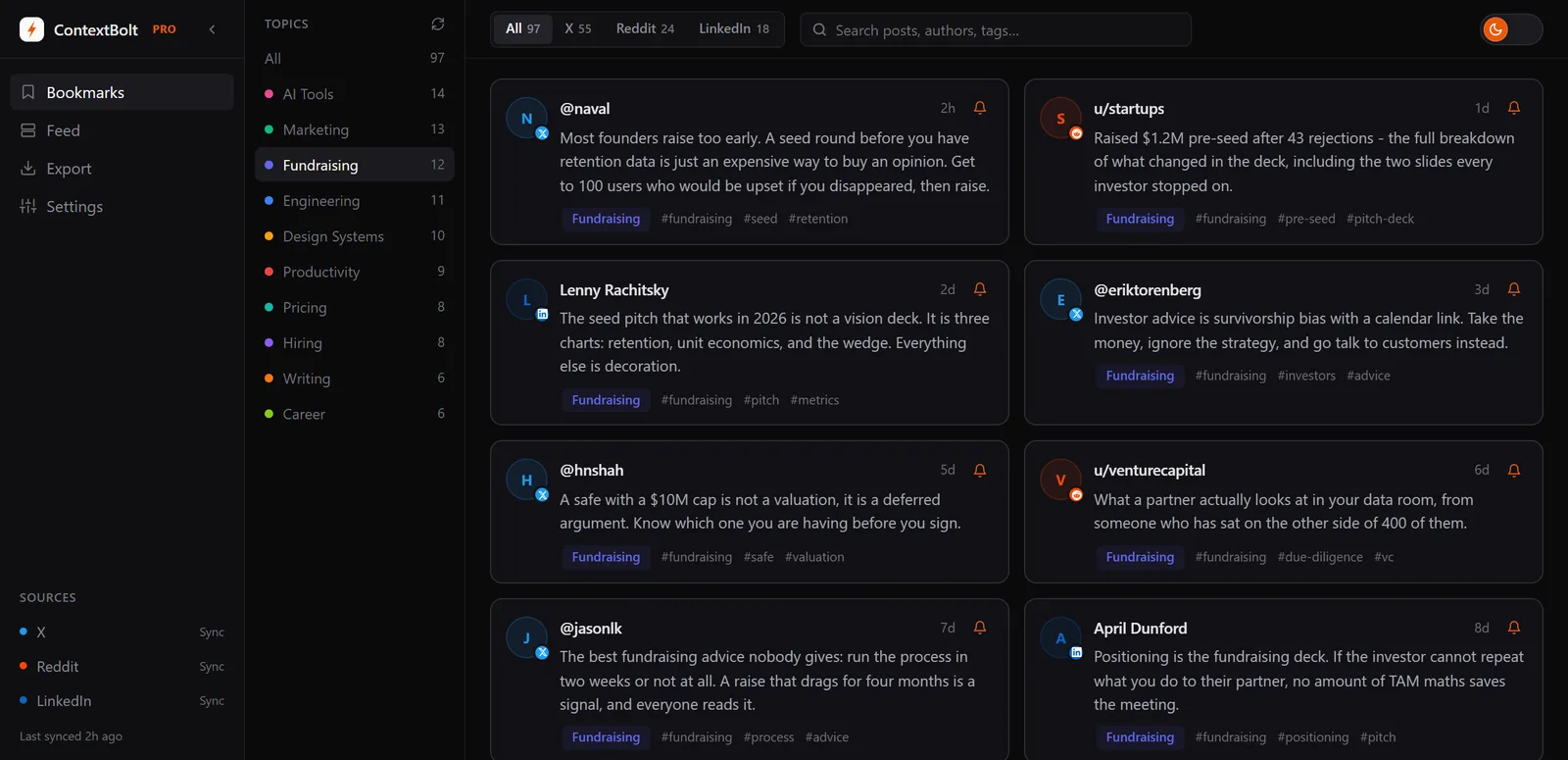
Saves from X, Reddit and LinkedIn sorted by topic, so you pick a subject instead of remembering a platform.
| Feature | Platform native | ContextBolt |
|---|---|---|
| Cross-platform view | No, each platform is separate | Yes. X, Reddit, LinkedIn and any web page in one library |
| Search type | Keyword only | Instant, typo-tolerant search over AI tags and full text |
| Auto-tagging and topics | None | AI-generated topic tags, grouped automatically by theme |
| Survives the original being deleted | No, a bookmark is a pointer to the post | Yes, the content is stored in your library |
| Price | Free (limited) | Free up to 150 bookmarks, then Pro at $6 a month removes the cap |
Pro is $6 a month, month to month. It removes the 150 cap, adds cloud sync, and gives you a personal MCP endpoint, a single connection that lets Claude Desktop, Cursor or Devin Desktop (formerly Windsurf) search your library by meaning in the middle of a conversation.
On scope: ContextBolt starts from your next save rather than importing an old app, and it runs in desktop Chrome, with no phone app. Basic is free up to 150 bookmarks, with no account and no card.
For a quick audit of your current habits first, 7 bookmark mistakes that kill your recall covers the small decisions that break a collection.