LinkedIn’s saved posts feature is the most useful thing on the platform that nobody can actually use.
You tap the bookmark icon on a hiring breakdown, a founder’s post-mortem, a recruiter thread worth revisiting. It lands in My Items. Then it disappears, because My Items is a reverse-chronological wall with no search box, no tags, and no folders. By save number 200 you have a private archive you cannot read.
That gap is the entire reason a tools market exists here. But LinkedIn is a harder platform to build for than Reddit or X, because there is no API for saved items at all. Every tool below works by reading the page in your browser, and that shapes what each one can and cannot do.
I went through the realistic options on what each one actually does. Seven are worth knowing about in 2026. Skip to the comparison table if you want the verdict in one screen.
Want My Items you can search? ContextBolt won. It is a free Chrome extension that adds a Save to ContextBolt button to every post in your feed, keeps the full text with the author, and tags it by topic so you can search it. It also imports the links from LinkedIn’s own Saved Items CSV. X and Reddit saves live in the same library.
Add ContextBolt to Chrome, freeThe other six are ranked below, with the push-to-Notion and one-time-backup options.
- ContextBolt wins overall, with AI tags and instant search across LinkedIn, X, and Reddit saves, plus an MCP endpoint with semantic search so an AI assistant can read them.
- LinkedMash wins if you need saves pushed into Notion, Airtable, or Sheets, the deepest export here, at LinkedIn-only scope.
- Dewey is the folders and tags option, across many social platforms.
- LinkedIn Saves Exporter wins for a free one-time backup with no subscription.
- Raindrop.io fits if you already keep a library there and clip the odd post into it by hand.
- The hard constraint: LinkedIn exposes no API for saved posts, so every tool here reads your browser page. None of them can sync in the background while you sleep.
Why LinkedIn saved posts need a separate tool at all
Reddit caps saves at 1,000 and silently stops showing the oldest ones. X’s paid tiers add folders, and its own bookmark search is basic. LinkedIn’s failure is different and in some ways worse. It lets you save as much as you like, then gives you no way at all to get back to any of it.
Here is what My Items does not do. There is no keyword search. There is no tagging. There is no folder structure. There is no sorting beyond newest first. There is no filter by author, by company, or by post type.
And the official export does not rescue you. LinkedIn’s data archive under Settings & Privacy, Data Privacy, Download your data will hand you a Saved Items CSV, but that file contains URLs and dates only. No headline, no author, no post text. If the original poster deletes their post, your “backup” is a dead link. There are ways to export LinkedIn saved posts with the content intact, but none of them is the button LinkedIn gives you.
So the job any real LinkedIn saved posts manager has to do is one of two things. Either make your existing saves findable, or copy the actual content somewhere you control before it vanishes.
How I judged these LinkedIn save tools
Use these criteria to pick your own winner if my ranking does not match your priorities.
- Search quality: Can you find a post by what it was about, or only by scrolling?
- Content capture: Does it copy the post text, or just the link?
- Platform scope: LinkedIn only, or does it cover X and Reddit in the same library?
- Account safety: Does it ask for your password or run automation LinkedIn would restrict you for?
- AI access: Can your saves feed into Claude or another assistant mid-conversation?
- Maintenance: Is it still working in 2026, given LinkedIn changes its DOM regularly?
I left out anything that asks for your LinkedIn login, anything marketed primarily as a lead-scraping tool, and anything that has not been updated since LinkedIn’s last major layout change.
LinkedIn saved posts managers compared side by side
| Tool | Best for | Price | Search type | Captures content | Other platforms |
|---|---|---|---|---|---|
| ContextBolt | AI search and recall | Free up to 150 bookmarks, $6/mo | Ranked + AI tags | Yes | X + Reddit |
| LinkedMash | LinkedIn-only, deep exports | Free plan, $120/yr, lifetime $249 | Text + AI chat | Yes | LinkedIn only |
| Dewey | Folders and tags | Free plan, Pro $10/mo | Keyword | Yes | X, Reddit, Bluesky and more |
| LinkedIn Saves Exporter | Free one-time backup | Free | None, offline file | Yes | LinkedIn only |
| Raindrop.io | General bookmark library | Free tier | Keyword | Title and preview | Any URL, manual |
| Notion Web Clipper | Saves inside an existing workspace | Free tier | Keyword | Partial | Any URL, manual |
| LinkedIn My Items | The baseline it replaces | Free | None | No | LinkedIn only |
The 7 best LinkedIn saved posts tools
1. ContextBolt
Best for AI search and recallContextBolt is ours, so weigh the bias. Here is where it fits and where it does not.
ContextBolt is a Chrome extension that adds a save button to every post in your LinkedIn feed, keeps the post with its text when you click it, tags each one by topic automatically, and indexes everything for instant, typo-tolerant search on your device. That last part is the difference that matters. You can search “founder announcement” and find a post that never used those words, because the AI tags did.
It covers LinkedIn, X, and Reddit in one library, which is the actual shape of the problem for most people. Very few of us save on only one platform.
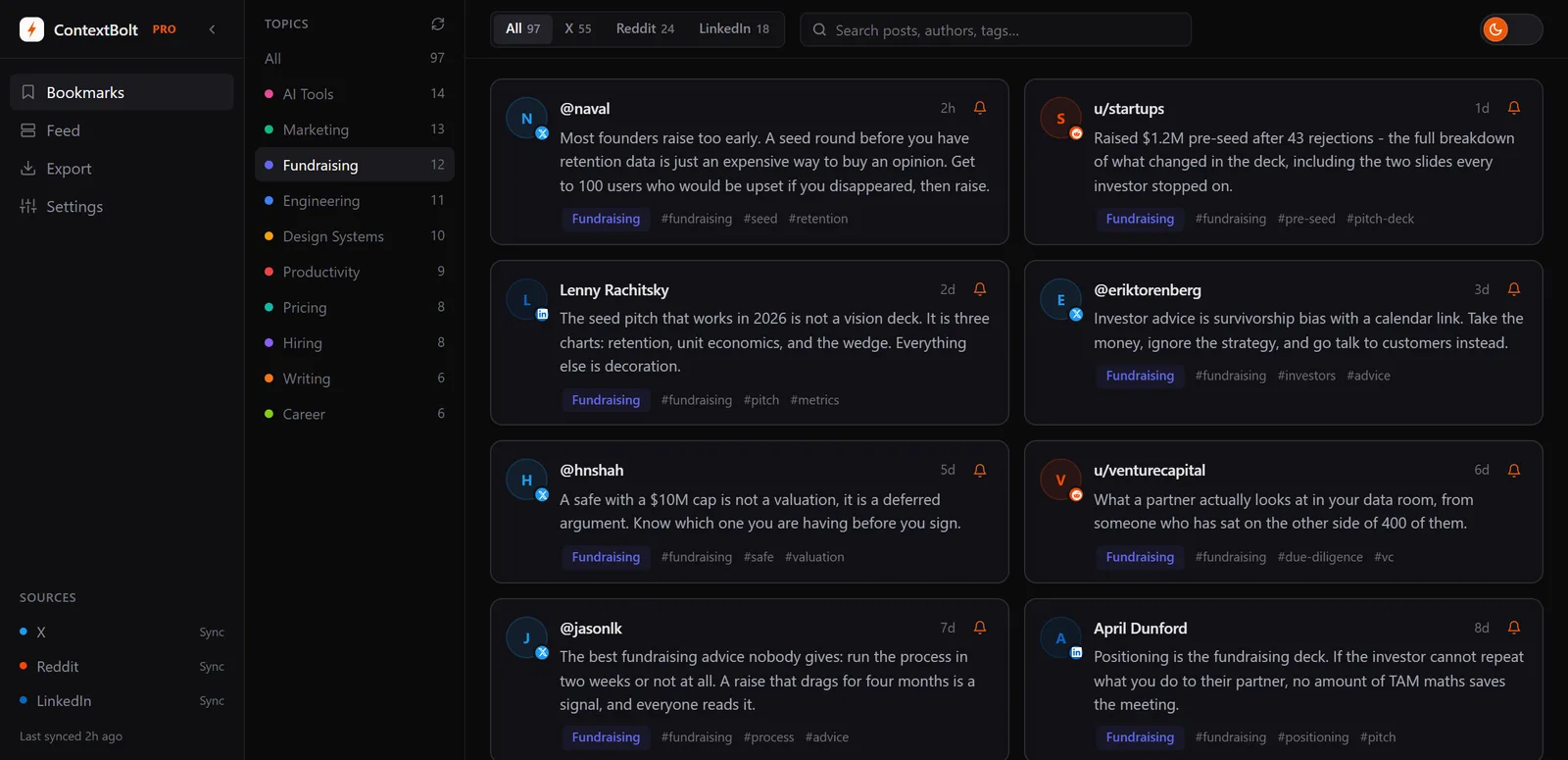
Topics are worked out from your own collection after each sync, with no manual tagging. LinkedIn saves land in the same searchable library as your X bookmarks and Reddit saves.
The MCP endpoint on the Pro plan is where that one library pays off. Your saved posts become a live tool inside Claude, Cursor, or any other MCP client, answering from LinkedIn, X and Reddit together, so you can ask what you saved about a topic without leaving the conversation you are already in. The setup guide for connecting bookmarks to Claude covers it end to end.
Scope, said once. Basic is capped at 150 bookmarks across all platforms combined, so a heavy LinkedIn month is the point where Pro earns its $6. For the saves you made before installing, request LinkedIn’s data export and ContextBolt imports the Saved Items CSV in one batch, since LinkedIn has no API to sync from.
- AI tags on every save, so search stops depending on exact wording
- Automatic topic tagging with no manual filing
- One library for LinkedIn, X, and Reddit
- MCP endpoint for Claude, Cursor, and Devin Desktop (formerly Windsurf) on Pro
- Copies post content, so a deleted post is still readable
- Never asks for your LinkedIn password
- Basic is capped at 150 bookmarks across all platforms combined; the full library is Pro
- MCP access is Pro, at $6 per month
- Existing saves come in through LinkedIn’s data export CSV, since LinkedIn exposes no API
Best for: Anyone who saves across more than one network and wants one search layer over the lot, especially if you already work inside Claude or Cursor.
Pricing: Free Basic, capped at 150 bookmarks. Pro is $6 per month for unlimited bookmarks, cloud sync, and MCP access.
Verdict: The strongest option if recall is your problem, and it files LinkedIn, X and Reddit saves into one searchable library with AI tags. Basic is free with no account, so try it on your next save.
I connect ContextBolt to Claude and Claude is able to conduct research through my curated list of bookmarks.
Rudy, ContextBolt Pro user
ContextBolt vs LinkedIn My Items, side by side.
| ContextBolt | LinkedIn My Items | |
|---|---|---|
| Search | Ranked search over the text and AI tags | None |
| Getting organized | AI topic tags, automatic | No tags, folders or sorting |
| A deleted post | Still readable, the text is kept | A dead link |
| X and Reddit saves | In the same library | LinkedIn only |
| Price | Free up to 150 bookmarks, Pro $6/month | Free, no cap |
What you give up against My Items is the free, uncapped list. Basic stops at 150 bookmarks across all three networks.
2. LinkedMash
Deepest Notion and Airtable exportLinkedMash is built for LinkedIn and nothing else, and that focus shows. It ships its own MCP server too; the difference is the library behind it, which holds LinkedIn alone. A Chrome extension syncs your saves once, then everything happens in a web app, with text search, filters by author, post type, and year, plus labels and custom collections.
Its real edge is export depth. It pushes saves into Notion, Google Sheets, Airtable, and Miro, which no other tool on this list matches. If your knowledge base already lives in Notion or Airtable, LinkedMash gets your LinkedIn saves in there with the least friction.
It also has an AI chat feature for querying across your saved posts, plus a developer API and a hosted MCP server exposing five tools. That is the richest LinkedIn-only feature set here.
The catches are platform scope and price. It is LinkedIn-only, so X and Reddit saves need a second tool. It has a free plan that imports and reads your saves but caps exports and Notion or Sheets sync at 20 posts, a 7-day trial with no card, Premium at $120 a year with the full API and MCP, and a $249 lifetime plan, against $6 a month for cross-platform coverage. Full breakdown in our LinkedMash alternatives comparison.
- Purpose-built for LinkedIn, not a port from another platform
- Best-in-class export to Notion, Sheets, Airtable, and Miro
- AI chat across your saved posts
- Filters by author, post type, and year
- Developer API and a hosted MCP server
- LinkedIn only, so no X or Reddit coverage
- The free plan caps syncing at 20 saves, so real use needs a paid plan
- Search is text matching, not semantic
Best for: Heavy LinkedIn users who save almost nothing elsewhere and want their posts flowing into Notion or Airtable automatically.
Pricing: Free plan, then Premium at $120/year with the full API and MCP. Lifetime is $249 once, and a $49 Exports Pass is good for 365 days. The 7-day trial needs no card. Read live on Oct 10, 2026.
Verdict: The pick if your saves need to land in Notion or Airtable and LinkedIn is the only place you save. It holds nothing from X or Reddit and its search is keyword matching, which is the ground ContextBolt covers with AI tags across all three. Our LinkedIn search guide walks through its sync flow in more detail.
3. Dewey
Best for folders and tagsDewey began as a Twitter bookmark manager and has since grown to cover LinkedIn, Reddit, Bluesky, and other platforms. It is one of the most established tools in the social-saves category and it has the richest manual organization features of anything here.
For LinkedIn, you get keyword search across your saves, tags, folders, and content backup so a deleted post survives in your archive. If you think in folders and you want to file things deliberately, this is the fit.
The limitation is the one every folder system shares. Dewey suggests tags with AI, but the folders and the final organization are yours to keep tidy, so quality depends on how disciplined you are. Most people are disciplined for about three weeks.
- Covers LinkedIn, X, Reddit, Bluesky, and more
- Folders and tags, with AI tag suggestions
- Backs up post content
- Mature product with a long track record
- CSV export
- Folders and tags still need your review
- Organization quality depends on your own discipline
Best for: People who genuinely enjoy filing things and want a mature cross-platform archive with folders.
Pricing: Free plan. Pro is $10 a month, or $7.50 a month billed annually.
Verdict: The folders-and-tags pick. Folders reward discipline at save time, and ContextBolt’s AI tags do that filing for you, which is the difference once the archive passes a few hundred posts.
4. LinkedIn Saves Exporter
Best free one-time backupA small category of Chrome extensions exists purely to solve the export problem, with LinkedIn Saves Exporter and LinkedIn Saved Posts Exporter being the two most commonly used. They work the same way. You open My Items, hit the button, and the extension auto-scrolls your entire saved list and downloads the actual post content as CSV or JSON.
This is the fix for LinkedIn’s official export being a list of bare links. Because the extension reads the rendered page, it gets the headline, the author, and the post body. That is a genuine backup rather than a record of where things used to be.
What you do not get is an ongoing system. There is no search interface, no tagging, and no sync. You get a file. If you want to search it later, you are searching a spreadsheet.
One practical warning. These extensions break periodically when LinkedIn changes its page structure. Check the reviews for recent activity before trusting one with a full archive run.
- Completely free
- Captures real post content, not just URLs
- Fast, usually a few minutes for a full archive
- No account or sign-up needed
- One-time export, not an ongoing system
- No search, tags, or organization
- Breaks when LinkedIn changes its layout
- LinkedIn only
Best for: Anyone who wants their saves safely on disk today and does not want a subscription.
Pricing: Free.
Verdict: The right first move for everyone, honestly. Export a backup even if you then pick a different tool for day-to-day use.
5. Raindrop.io
Best general bookmark libraryRaindrop.io is a full-featured bookmark manager rather than a LinkedIn tool, and that is both its strength and its weakness here. You clip a LinkedIn post with the browser extension and it lands in the same library as your articles, docs, and links, with collections, nested tags, and full-text search across the lot.
If you already run your reading life out of Raindrop, adding LinkedIn posts to it beats maintaining a second silo. The search is good and the organization model is genuinely excellent.
The catch is that it is entirely manual and it does not know what LinkedIn is. Clipping happens one post at a time, and there is no way to pull in the saves already sitting in My Items. You are starting from zero, going forward only. It also captures the page preview rather than the full post, so long posts get truncated.
- Excellent collections, nested tags, and full-text search
- Generous free tier
- Works on any URL, not just LinkedIn
- Strong apps across desktop and mobile
- Fully manual, one post at a time
- Cannot import your existing LinkedIn saves
- Captures preview text, so long posts get cut
- AI search sits on the Pro plan
Best for: Existing Raindrop users who want LinkedIn posts in the same place as everything else.
Pricing: Free tier available, paid plan for advanced features.
Verdict: A good library, a poor LinkedIn tool. See the best Raindrop alternatives if you want the organization model without the manual work.
6. Notion Web Clipper
Best for saves inside an existing workspaceNotion’s Web Clipper drops a LinkedIn post into a Notion database, where you can add your own properties, link it to projects, and write notes alongside it. For anyone already running their work in Notion, that context is worth more than any dedicated tool’s feature list.
It is the best option on this list for turning a save into something you actually act on, because the save lands next to the project it relates to rather than in a separate archive you never open.
The trade-off is capture quality. The clipper struggles with LinkedIn’s post structure and often grabs a partial or messy version of the content. It is also fully manual with no bulk import. Treat it as a way to promote a handful of important saves into your workspace, not as a home for all of them.
- Saves land next to the projects they relate to
- Add your own properties, notes, and relations
- Free for personal use
- Searchable alongside the rest of your workspace
- Capture quality on LinkedIn posts is inconsistent
- Manual, no bulk import of existing saves
- Notion search is keyword only
Best for: Notion-centric workers promoting a few important posts into active projects.
Pricing: Free for personal use.
Verdict: Great for the handful of saves that matter. Wrong tool for an archive of 800. Our Notion bookmarks alternative breakdown covers where the seams show.
7. LinkedIn My Items and the official data archive
The free baselineWorth including because it is what everyone starts with, and because you should know exactly what it does before paying for anything else.
My Items holds your saves indefinitely with no published cap. That part works. What it does not have is search, tags, folders, or any sort order beyond newest first.
The official archive request under Settings & Privacy, Data Privacy, Download your data will produce a Saved Items CSV. Tick Saved Items on its own for the faster request, though LinkedIn lists that file among the ones that can take up to 48 hours. LinkedIn’s help page states no limit on how often you can request it.
Then you open it and find URLs and dates. That is all. No headline, no author, no post text. It proves what you saved and when, and nothing about what any of it said.
- Free and built in
- No storage cap on saves
- No stated limit on export requests
- Nothing to install
- No search at all
- No tags, folders, or sorting
- Export is URLs and dates only
- A deleted post leaves you a dead link
Best for: Light users under about 100 saves who can still find things by scrolling.
Pricing: Free.
Verdict: Fine until it is not. The moment you scroll for more than a minute looking for something, you have outgrown it.
Which LinkedIn saved posts manager should you pick
Match the tool to the problem you actually have, not to the longest feature list.
- You cannot find old saves: ContextBolt. AI tags on every save are the only thing that solves recall at scale, and they work across LinkedIn, X, and Reddit at once. On Pro, semantic search through MCP goes further still.
- You only save on LinkedIn, and you live in Notion or Airtable: LinkedMash. The export depth is worth the higher price if the platform scope fits.
- You want to file things into folders yourself: Dewey. Mature, cross-platform, built around folders and tags.
- You just want your saves safe on disk: a free export extension. Do this today regardless of what else you choose.
- You already live in Raindrop or Notion: keep them for the few posts you act on. Neither can see My Items, so the archive itself still needs a tool that reads it.
- You have fewer than 100 saves: stay on My Items. You do not have this problem yet.
One honest note that applies to every paid option here. None of them can sync in the background, because LinkedIn has no saved-items API for anyone to build on. Any tool claiming otherwise is either scraping with your credentials, which risks your account, or overstating what it does.
The thing every LinkedIn save tool is really fixing
Saving is not the hard part. LinkedIn nailed saving years ago. It is one tap and it is free and it works.
Retrieval is the hard part, and LinkedIn has never built it. That is why a market exists for tools that do nothing except add a search box to a feature that already exists.
Pick something, and export a backup while you are at it, because the saves you cannot search are functionally the same as the saves you never made. If the problem is finding what you saved, ContextBolt Basic is free and needs no account, so the cheapest test is your next save.