Reddit’s saved list is one of the most frustrating features in social media.
No search. No tagging. No categories. A hard 1,000-post cap that silently stops showing your oldest saves without any warning. And Reddit’s official help page on saving posts is a short how-to that says nothing about the cap.
Paying Reddit does not fix any of it. Premium buys an ad-free feed, higher content limits and cosmetic perks, not a bigger or smarter saved list. Which is why every fix below is a third-party one.
So I went through every Reddit saved posts manager I could find, on what each one actually does today. Six are worth your time in 2026. Skip to the comparison table for the verdict in one screen.
Want a saved list you can actually search? ContextBolt came first. It is a free Chrome extension that syncs your Reddit saves in the background whenever you browse reddit.com in desktop Chrome, tags each one by topic, and searches text and tags on your device. It keeps what it has synced past the 1,000 cap, and your X and LinkedIn saves share the same library. Basic is free up to 150 bookmarks. Pro removes the cap for $6 a month.
Add ContextBolt to Chrome, freeThe other five are ranked below, including the free Reddit-only options.
- ContextBolt wins overall, with AI tags on every save, instant on-device search, and an MCP endpoint with semantic search behind it.
- Bookmarkeddit is the Reddit-only pick, open source with keyword search in your browser.
- Dewey is the multi-platform folders pick, with post backup and CSV export.
- Reddit Saved Downloader wins for one-click export to CSV or HTML, two-minute setup.
How we picked these Reddit saved post tools
Here’s what I looked for. Use these criteria to pick your own winner if my ranking doesn’t fit your priorities.
- Search quality: Can you find a post by meaning, not just exact words?
- Capacity: Does it keep saves beyond Reddit’s 1,000-save cap, or are you still limited?
- Privacy: Where is your library stored, and what is sent to an external server?
- Platform scope: Reddit only, or does it also handle X and LinkedIn saves in one place?
- Active maintenance: Is the tool still working and updated in 2026?
- AI integration: Can your saved posts feed into Claude, Cursor, or other AI tools mid-conversation?
I excluded tools that are clearly abandoned (no updates in two-plus years), tools that require a command-line setup to function, and one scraper that stopped working after the 2023 Reddit API changes.
Reddit saved post tools: head-to-head comparison
| Tool | Best for | Free tier | Search type | Past Reddit’s 1k cap | Multi-platform |
|---|---|---|---|---|---|
| ContextBolt | AI search + MCP | Yes (150-bookmark cap) | Ranked + AI tags | Keeps what it has synced | X + Reddit + LinkedIn |
| Bookmarkeddit | Reddit-only, in-browser | Free | Keyword | No (API cap) | Reddit only |
| Dewey | Folders + backup | Free plan | Keyword | Yes | X, Reddit, LinkedIn, Bluesky and more |
| Updoot.app | Quick subreddit browse | Free | Fuzzy | No | Reddit only |
| RedditManager | Simple, no sign-up | Free | Keyword | No | Reddit only |
| Reddit Saved Downloader | One-click backup | Free | Offline search | No (API cap) | Reddit only |
The 6 best Reddit saved post tools
1. ContextBolt
Best for AI search + MCPContextBolt is ours, so weigh the bias. Here is where it works and where it doesn’t.
ContextBolt is a Chrome extension that syncs your Reddit saves in the background whenever you load reddit.com in desktop Chrome, with no Saved-page visit needed. Every save is tagged by topic using AI and indexed on your device for instant, typo-tolerant search across those tags and the full text. You can search “career advice” and find a post that never used those exact words, because the tagger did. True semantic search runs through the Pro MCP endpoint. The larger your save library gets, the more that distinction matters.
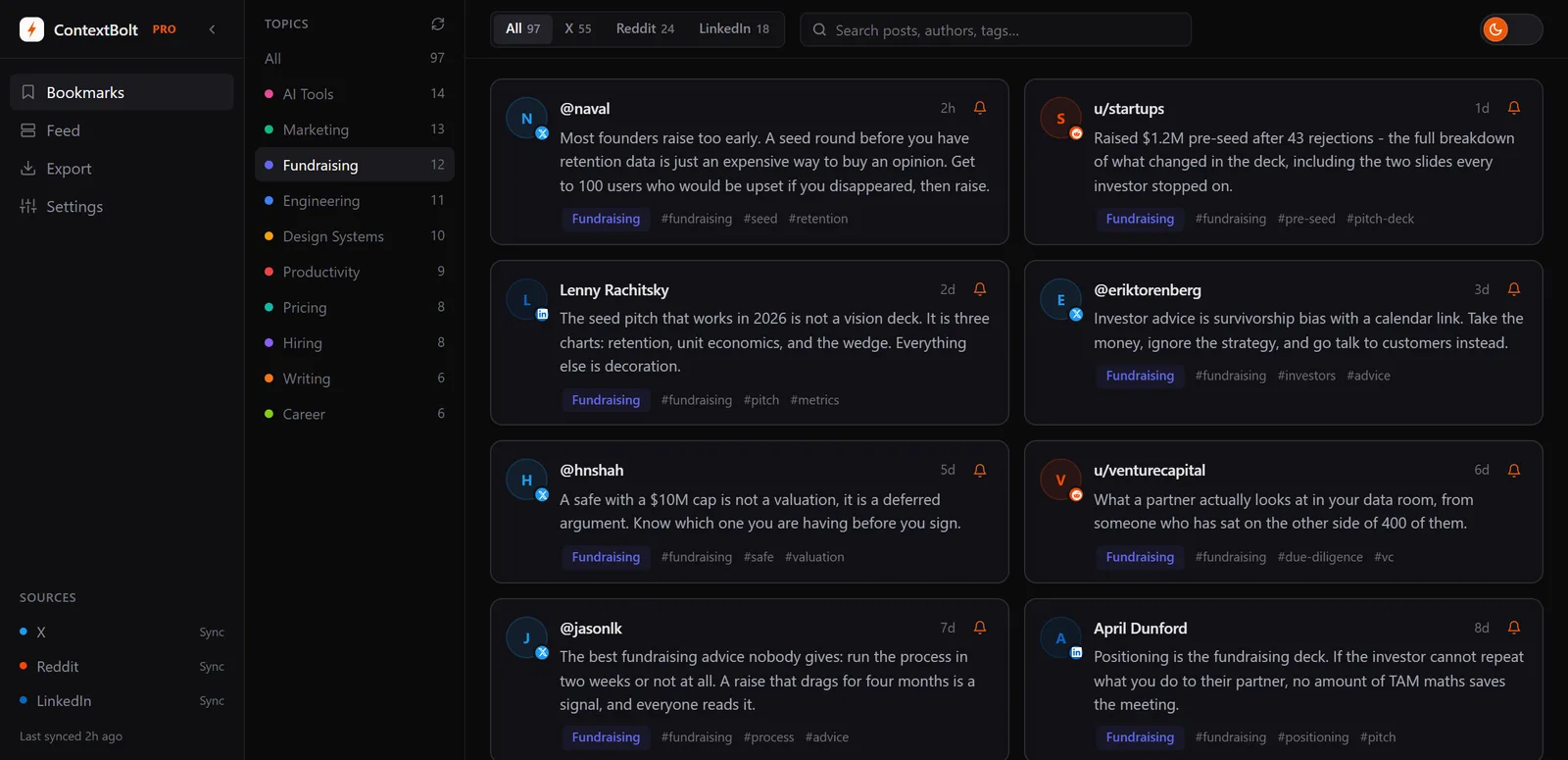
Topics are worked out from your own collection after each sync. No manual tagging. Your Reddit saves land in the same searchable knowledge base as your X and LinkedIn bookmarks.
The MCP endpoint for Pro users is where that shared library pays off. Your entire Reddit save library becomes a live tool inside Claude Desktop, Cursor, or Devin Desktop (formerly Windsurf). You can ask Claude what you’ve saved about any topic, mid-conversation, without leaving your workflow. The full guide to connecting bookmarks to Claude via MCP covers the setup in detail.
One limit to know. Basic is capped at 150 bookmarks across all platforms combined, so a 2,000-save Reddit archive needs Pro. Basic is free with no account, so the cheap move is to install it before you hit the cap.
- AI tags and instant search across all saves
- AI auto-tagging with no manual work
- Covers X + Reddit + LinkedIn in one place
- MCP endpoint for Claude, Cursor, and Devin Desktop (Pro)
- Library stored in your browser (post text goes to our server and AI providers to be tagged)
- No Reddit API app to register (it reads saves through your signed-in Chrome session)
- Free tier is capped at 150 bookmarks across all platforms combined
- MCP requires Pro at $6/month
- Export to CSV, JSON or XLSX is a Pro feature
Best for: Anyone using Claude, Cursor, or another AI tool who wants Reddit saves available as live context mid-conversation. Also the right pick if you save across X, Reddit, and LinkedIn and want one search layer for all three.
Pricing: Free Basic, capped at 150 bookmarks across all platforms. Pro is $6/month for unlimited bookmarks, cloud sync, and MCP access.
Verdict: If recall is your problem, this is the pick. AI tags do the filing, search runs on your device, and Pro puts the lot inside Claude. Basic is free, so start today.
2. Bookmarkeddit
Reddit-only, open sourceBookmarkeddit is a free, open-source upgrade to Reddit’s native saves for people who only save on Reddit. Open source on GitHub. Your data never leaves your browser because there is no server storing it.
One caveat that is easy to miss. It has shipped a single commit since May 2025, and it requests the save scope rather than read-only access. Neither is a dealbreaker, and our Bookmarkeddit alternative guide covers what to do about each.
It uses Reddit’s official OAuth to fetch your saves, then stores everything in your browser’s local storage. You get keyword search across titles, subreddits, authors, and post content. You can filter by post type (link, text, image) and browse by subreddit. It reads your saves through Reddit’s API, so it sees the same 1,000-item listing as every other API tool.
It’s not flashy. The interface is clean and functional but there is no AI tagging, no semantic search, and no export function. What it does, it does well and it does it for free.
- Completely free, no account beyond Reddit OAuth
- Data stays in your browser, never on a third-party server
- Keyword search across title, author, subreddit, and content
- Open source on GitHub
- No semantic search
- No export function
- Reddit only
Best for: Privacy-conscious users who want a proper search layer on top of Reddit saves without paying for a subscription or sending data to any external server.
Pricing: Free. No paid tier.
Verdict: The Reddit-only option, if keyword search across your full Reddit history is all you need. It stops at Reddit and search is keyword only, which is where ContextBolt’s AI tags and cross-platform library start.
3. Dewey
Best for folders + post backupDewey started as a Twitter bookmark manager and has expanded to cover Reddit, LinkedIn, Bluesky, and other platforms. It’s one of the most established tools in the social-bookmarks space, with a deep feature set for organizing by hand.
For Reddit specifically, Dewey gives you fast keyword search across your saves, lets you sort by subreddit, and allows you to tag threads manually. It backs up post content, so your saves survive even if the original post gets deleted or a subreddit gets banned. That backup feature is genuinely useful for researchers or anyone saving content for citation.
The limitation is the same as any folder-based system. The filing is yours to refine, even with AI tag suggestions, and whether it searches by meaning is not something we have verified. Once you have saved a thousand posts, a folder tree is only as good as the day you set it up.
- Cross-platform: Reddit, X, LinkedIn, Bluesky and more
- Tag and folder system with AI tag suggestions
- Backs up post content (survives deletion)
- Fast keyword search
- CSV export
- Search by meaning is not something we have verified
- Pro is $10/month, against $6 for ContextBolt Pro
- Folders and tags still need your review to stay tidy
Best for: Researchers and journalists who want a curated, cross-platform archive with folders, post backup, and export.
Pricing: Free plan, then Pro at $10/month or $90/year. Lifetime is $225 once, and there is a separate $50 Export Pass valid for 48 hours. Verified September 10, 2026.
Verdict: If you want to curate an archive by hand, with folders, post backup and CSV export, Dewey is a capable option for curating by hand. ContextBolt tags by topic on arrival, at a lower price.
4. Updoot.app
Best for quick subreddit browsingUpdoot is a lightweight free web app that gives your Reddit saves a better browsing interface. Connect your Reddit account via OAuth and Updoot pulls your saved posts and comments into a cleaner layout than Reddit’s native page.
The fuzzy search is the standout feature. Type a rough description of what you’re looking for and it will find close matches even if you misspell words. You can filter by subreddit, pin important saves to the top, and toggle NSFW content.
It does not bypass the 1,000-post cap. It shows whatever Reddit currently has in your save list. If older saves have already been deleted, Updoot can’t recover them. This is a browsing improvement, not an archiving solution.
- Free, no sign-up beyond Reddit OAuth
- Fuzzy search with misspelling tolerance
- Filter by subreddit
- Pin saves to the top for quick access
- Cleaner interface than Reddit native
- Does not bypass the 1,000-save limit
- No export or offline backup
- Reddit only
Best for: People who want a better reading experience for their current Reddit saves without needing to bypass the cap or export anything.
Pricing: Free. No paid tier.
Verdict: Good for casual browsing, not for long-term archiving. Use it for quick access to recent saves. Pair it with ContextBolt or the Reddit Saved Downloader if the 1,000-cap is a concern.
5. RedditManager
Best for bulk cleanupRedditManager is a free web tool that groups your Reddit saves by subreddit, with basic keyword search and the ability to delete saves in bulk. Connect with Reddit OAuth and you’re in with no setup.
Its clearest use case is cleanup. If your Reddit save list has accumulated years of junk and you want to delete hundreds of old saves quickly to stay below the cap, RedditManager lets you delete by subreddit in batches rather than one at a time on Reddit’s native page. That alone saves significant time.
It doesn’t bypass the cap or create an archive. Once you delete saves through it, they’re gone.
One thing to know before you connect it. It requests five Reddit permissions under a permanent grant, one of which is the ability to vote from your account, and it powers no feature on the site. Full breakdown in our RedditManager review.
- Free, no sign-up beyond Reddit OAuth
- Bulk delete by subreddit
- Groups saves by subreddit for easy browsing
- Basic keyword search
- Very basic feature set
- Does not bypass the 1,000-save limit
- No export or backup before deletion
Best for: Anyone who needs to do a cleanup pass and wants to delete batches of old saves by subreddit quickly. Use it alongside ContextBolt rather than as your primary save manager.
Pricing: Free.
Verdict: A cleanup tool, not an archive. Export or sync your saves to another tool first, then use RedditManager to trim the Reddit-side list.
6. Reddit Saved Downloader
Best for one-click offline backupReddit Saved Downloader is a Chrome extension that converts the saves Reddit shows you into an offline archive. Export to HTML, CSV, or JSON in one click. Updated in January 2026 and still actively maintained.
The appeal is simplicity. Install the extension, visit your Reddit saved page, click one button, and your saves download in under a minute. The exported HTML version includes a working offline search function.
It’s a snapshot, not a live tool. Saves you make tomorrow aren’t in the export until you run it again. But for anyone who wants a local archive they actually own, that’s a reasonable trade-off. No external server ever sees your data.
- One-click export to HTML, CSV, or JSON
- Works offline once downloaded
- Free Chrome extension
- Offline search in the exported HTML file
- Static snapshot, not a live-syncing tool
- Requires manual re-export to stay up to date
- Reddit only
Best for: Anyone who wants a permanent, portable backup of Reddit saves without paying for a subscription or creating an account on another platform.
Pricing: Free.
Verdict: The best pure backup tool on this list. Run it monthly and you’ll always have a local copy that no platform change can take from you.
Honorable mention Reddit saved post tools (and what I skipped)
A few tools came up in research but didn’t make the ranked list.
- Saveddit is an open-source Reddit manager for previewing, searching, sorting, and exporting saved posts. It’s functional, but its repository was last pushed to in March 2022, and Bookmarkeddit covers the same use case and is the more recently updated of the two. Full breakdown in the Saveddit alternative guide, including the second, unrelated tool that shares the name.
- Readdit Later is a Chrome extension that showed up in search results. The Product Hunt listing is old and I couldn’t verify it was actively maintained in 2026. Worth checking the Chrome Web Store directly before committing to it.
- Reddit Librarian is a folder-based organizer. Folders have the same fundamental problem as every other folder system. You’re predicting your future categories at save-time. That pattern breaks at scale.
- Bulk Downloader for Reddit is a command-line tool for power users who want to download media alongside their saves. Powerful if you’re comfortable with a terminal, not accessible to most people.
Can you self-host a Reddit saved posts manager, or send saves to Obsidian?
Yes, and plenty of people are building one. Several newer Reddit saved post managers are open-source projects that write your saves to Markdown files, on your own machine or in your Obsidian vault.
There is one catch to know before you start. Since November 2025, Reddit’s Responsible Builder Policy says you “must request access and get explicit approval before accessing any Reddit data through our API.” Every do-it-yourself tool that asks you to create your own app at reddit.com/prefs/apps now waits on that approval.
- Reddit Stash: Open source (MIT). It saves your saved posts and comments as Markdown files sorted by subreddit, and runs on your computer, in Docker, or on a GitHub Actions schedule, with optional copies to Dropbox or S3. Its README warns that new Reddit API apps now need pre-approval and puts the wait at 2 to 4 weeks. It also has a mode that reads Reddit’s own data export instead, with no API credentials at all.
- Saved Reddit Exporter: A free Obsidian plugin on GitHub. It writes saved posts, saved comments and upvotes into your vault as Markdown notes, and it works in Obsidian on your phone. It needs the Client ID of your own Reddit app, so the approval step above applies.
Both handle the 1,000-save cap the same way. Their READMEs say that unsaving what you have exported lets the next batch of older saves appear on the following run.
ContextBolt skips the app step. It reads your saves through the reddit.com session you are already signed in to in Chrome, so there is nothing to register and nothing to wait for. The trade-off is that it syncs when you browse reddit.com in desktop Chrome, not from your phone.
How to choose the right Reddit saved post tool for you
Here’s a decision framework. Pick the line that sounds most like your situation.
- If you use Claude, Cursor, or another AI tool day-to-day, pick ContextBolt. The MCP endpoint turns your saves into live context inside your AI conversations, from X and LinkedIn as well as Reddit.
- If you only save on Reddit and want keyword search in your browser, pick Bookmarkeddit. Open source, no server, no AI tags.
- If you save across X, Reddit, and LinkedIn and want one search layer, pick ContextBolt. It brings all three into one library, which is the thing a Reddit-only tool cannot do for you.
- If you save content for research or journalism and need post backup, pick Dewey. Post backup and CSV export are the draw.
- If you need to delete large batches of old saves quickly, use RedditManager first, then set up something for ongoing management.
- If your save count is under 200 and you just want a cleaner browsing experience, Updoot is fast and requires no setup beyond the OAuth step.
- If you want a portable backup you can open offline, use Reddit Saved Downloader monthly as a habit.
- If you want your saves as Markdown files in Obsidian or on your own server, use Reddit Stash or Saved Reddit Exporter, and budget for Reddit’s API approval wait (or use Reddit Stash’s data-export mode, which needs no app).
One thing I’d flag above everything else. The 1,000-save cap is the first problem to fix. If you haven’t synced your saves to a tool that stores them beyond Reddit’s limit, install ContextBolt Basic, which is free up to 150 bookmarks, or run Reddit Saved Downloader today.
Reddit doesn’t warn you when you hit 1,000. Your oldest saves just stop appearing, in the feed and in the API, with no message, though they are not deleted. There is one recovery path that needs no unsaving, and it is not a tool. Reddit’s own data export is built from its records rather than the feed, so it reaches saves that dropped out of view years ago. It hands them back as bare links with no content, which for a save that old is often a page that no longer loads.
Two product names get in the way while you look for that path. Reddit Premium and Reddit Pro sound like two rungs of the same ladder and are unrelated products, one paid and one free, and neither does a thing for your saves.
The broader reality is that Reddit has zero incentive to fix this feature. Saves don’t drive ad revenue. They don’t appear in the main feed. The platform built the feature and then stopped caring about it, while millions of users kept using it to collect genuinely valuable content.
The tools on this list exist because Reddit left a gap. Most are free, most are built by one or two people, and most are better than what Reddit ships natively. That’s both impressive and slightly embarrassing for a platform with hundreds of millions of registered users. Start with the one that syncs your saves and files them for you. ContextBolt Basic is free with no account, so the test costs you your next save.