Mozilla shut Pocket down on July 8, 2025.
The official announcement cited “evolving user behavior.” The real reason is economics. Read-later apps are genuinely hard to monetize at scale, and Pocket was never central enough to Mozilla’s mission to justify the infrastructure cost. Users first had until October 8, 2025 to export their data, and Mozilla extended the deadline twice, to November 6 and then November 12, 2025. After that, everything was deleted permanently.
If you missed the export window, that data is gone. If you exported in time, you now need somewhere to take it.
This guide covers 8 alternatives. I’ve tried to be honest about which ones replace Pocket well and which ones solve a slightly different problem. Not every Pocket user needs the same replacement. If you saved from the open web and from X, Reddit or LinkedIn, the migration walkthrough gets you set up in three steps.
Skip to the comparison table for the verdict in one view.
- ContextBolt is the pick if you want one place that holds everything. It is the only one here that saves web pages and pulls in your X, Reddit and LinkedIn saves automatically. Free to start.
- Raindrop.io is the closest free look-alike of the old Pocket list, import included.
- Readwise Reader wins as the premium option for serious readers.
- Instapaper stays the cleanest free read-later app.
- Wallabag if you never want to worry about another shutdown.
Why Pocket is hard to replace
Pocket did three things at once. It saved articles from the web with one click, stripped away the clutter so you could read them properly, and synced everything across every device. That combination was hard to beat at the price point (free).
Most alternatives do one or two of those things well. Very few do all three in a way that feels as frictionless as Pocket did at its best.
The other thing worth knowing before you pick a replacement is that a lot of people used Pocket for saving more than for reading. If that describes you, the “read-later” framing isn’t what you need. You need something that makes saved content findable, not something that makes it prettier to read. If your saves were mostly from Reddit or LinkedIn rather than the open web, how to search Reddit saves and how to search LinkedIn saved posts go deeper on each platform.
Pick your replacement based on which half of Pocket you actually used.
How we picked these Pocket alternatives
Six criteria shaped the ranking.
- Save frictionlessness: How many clicks to save an article?
- Reading quality: Does it strip ads and clutter properly?
- Search: Can you find saved content by keyword or meaning?
- Pocket import: Can it import your existing Pocket export?
- Cross-platform: iOS, Android, web, desktop?
- Shutdown risk: Is it sustainable, self-hosted, or local-first?
I weighted shutdown risk higher than most lists do, for obvious reasons.
Pocket alternatives: head-to-head comparison
| Tool | Best for | Free tier | Price | Pocket import | Search type |
|---|---|---|---|---|---|
| ContextBolt | Web pages plus X, Reddit and LinkedIn | 150-bookmark cap | Free + $6/mo Pro | No Pocket import | Ranked + AI tags |
| Raindrop.io | Look-alike of the old list | Unlimited saves | Free + $3/mo Pro | Yes | Full-text + AI |
| Readwise Reader | Power readers | 30-day trial | ~$10/mo annual | Yes | Full-text + AI |
| Instapaper | Simple offline reading | Unlimited saves | Free + $5.99/mo Premium | Yes | Keyword (Premium) |
| Matter | iOS users, audio reading | Unlimited saves | Free + Premium | Via CSV | Keyword |
| Wallabag | Self-hosters, zero shutdown risk | Free (self-hosted) | Free / from ~€11/yr hosted | Yes | Keyword |
| GoodLinks | Apple users, one-time fee | One-time purchase | $9.99 one-time | Yes | Keyword |
| Pinboard | Minimalists, reliable archiving | No free tier | $22/yr or $39/yr | Yes | Full-text (archival plan) |
The 8 best Pocket alternatives
1. ContextBolt
Best for web and social in one placeContextBolt is ours, so here’s the honest positioning.
ContextBolt saves web pages and the posts you save on X, Reddit and LinkedIn into one library. That combination is the whole reason to pick it. Every other tool on this list does one half, or needs you to feed it the other by hand.
On the web half, you click the extension and press Save this page. It keeps the title, the author, the site and the article text, stripping the nav, the ads and the comments first. Because it reads the tab you already have open rather than fetching the URL, it works on pages behind a login and on subscriptions you pay for. Select a paragraph before you save and it keeps only that. Click a save in the dashboard later and it opens in ContextBolt Reader, a clean reading view of that text, even after the original page is gone.
On the social half, it captures posts from X, Reddit, and LinkedIn natively via the same Chrome extension, AI-tags everything by topic at save-time, and searches those tags alongside the full text instantly on your device. That means “remote team culture” actually works even when you don’t remember the exact words. Full semantic search comes with the Pro MCP endpoint.
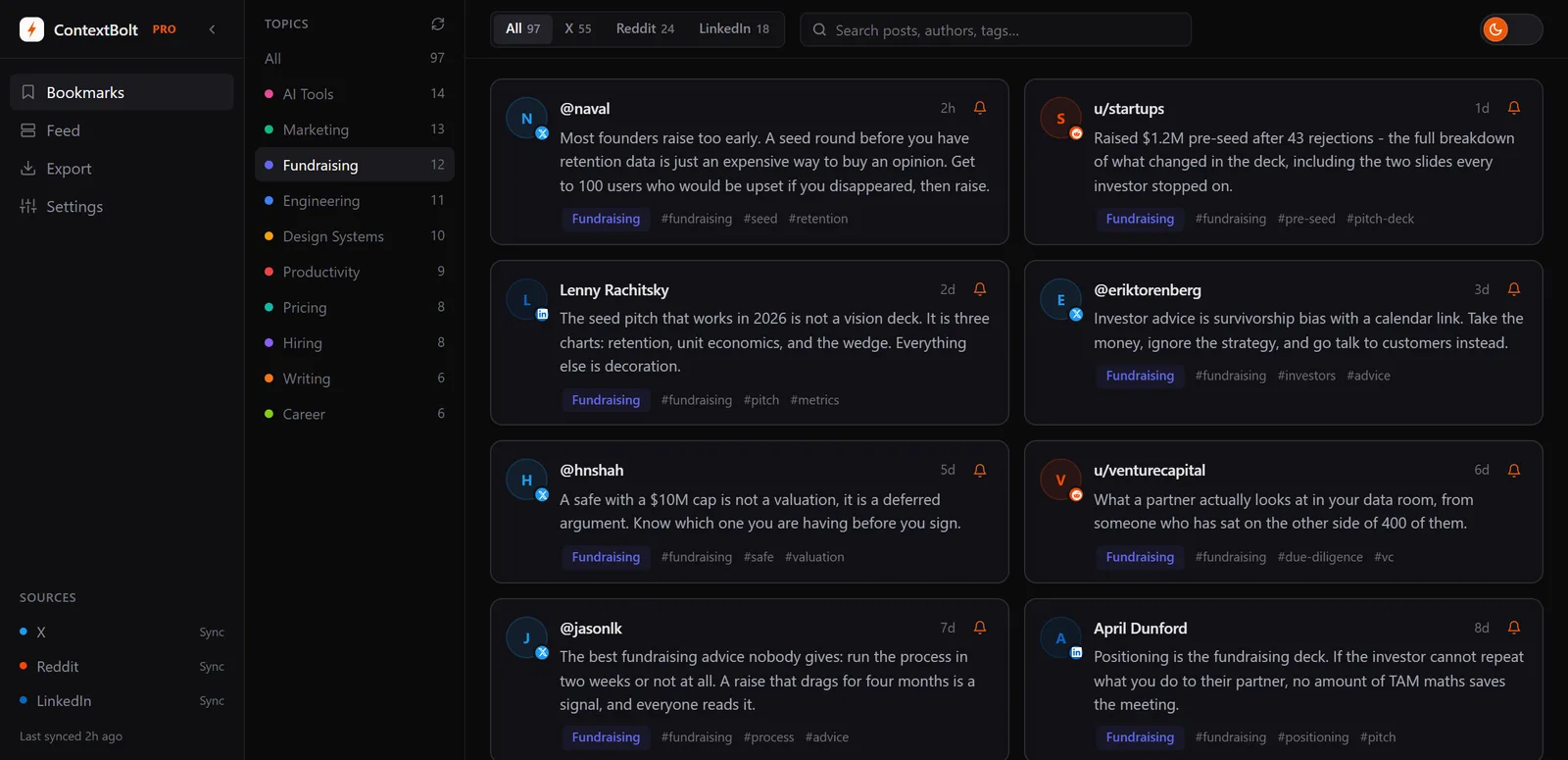
Topics are generated automatically from your own bookmarks. No manual tagging. Your social saves become a searchable knowledge base.
Pro users also get an MCP endpoint that connects the bookmark library to Claude Desktop, Cursor, and Windsurf. You can ask Claude what you’ve saved about any topic mid-conversation. The guide to connecting bookmarks to Claude via MCP covers the setup.
If what you wanted from Pocket was to find things again, this is the closest fit on the list, and the reading at your desk comes with it. Reading on the train is a different job, because it runs in desktop Chrome.
- Saves web pages and X, Reddit and LinkedIn posts into one library
- Keeps the page text, not just the link, so search works on what the page said
- Works on pages behind a login, because it reads your own tab
- AI auto-tagging and instant search
- MCP endpoint for Claude, Cursor, and Windsurf (Pro)
- Local-first storage, content preserved even after the original is deleted
- Free tier is capped at 150 bookmarks
- No highlighting or notes, though every save opens in a clean reading view
- Desktop Chrome only, no phone app
- No importer for a Pocket export, though it picks up your existing X and Reddit saves and takes LinkedIn’s Saved Items CSV, and Basic is capped at 150 bookmarks
Best for: Anyone who saves in two places at once, articles from the open web and posts on X, Reddit and LinkedIn, and is fed up that neither tool knows about the other.
Pricing: Free Basic, which is capped at 150 bookmarks. Pro $6/month for unlimited bookmarks, cloud sync, and MCP.
Verdict: The only tool here that covers both halves of what you save, and the strongest at handing something back six months later when all you remember is the argument. Basic is free, so try it on your next save.
As an X/Twitter user, I’ve bookmarked close to 2,000 tweets, posts, videos and articles over the years. The problem is there isn’t an easy or straightforward way for me to extract, summarise, or synthesise the content I find insightful… ContextBolt solves this challenge for me.
Zayne, building a personal knowledge base
ContextBolt vs Pocket, side by side.
| ContextBolt | ||
|---|---|---|
| Still running | Yes | Shut down July 2025 |
| X, Reddit and LinkedIn saves | Captured as you save them | Manual save only |
| Getting organized | AI tags and topics on arrival | Tags you added yourself |
| Inside Claude or Cursor | MCP endpoint on Pro | Nothing to connect |
| Price | Basic free, Pro $6/month | Was $4.99/month |
What you give up against the old Pocket is a phone app and a Pocket import. The full head-to-head is in ContextBolt vs Pocket.
2. Raindrop.io
Closest look-alike of the old Pocket listRaindrop.io is the closest one-to-one Pocket replacement. Free tier with unlimited saves. Clean reading view. Cross-platform apps. Full-text search on the Pro plan. Pocket CSV import built in. It ticks every box that Pocket ticked, at the same price point (free).
Beyond the Pocket basics, Raindrop adds nested collections, cover image previews, and collaborative sharing. The Pro plan ($3/month, or $28/year) adds full-text search, permanent copies of pages, and cloud backup to Dropbox or Google Drive. The permanent copy feature is worth noting. Raindrop saves a cached version of the page so dead links don’t break your library.
Where it differs from Pocket is that Raindrop is more of a bookmark manager than a read-later app. The reading experience is clean but not as polished as Readwise Reader or Instapaper. If filing and organizing links by hand was the point, Raindrop does that cheaply. It never sees a post you saved on X or Reddit, which is the half ContextBolt fills in.
- Unlimited saves on the free plan
- Direct Pocket import
- Nested collections and smart filters
- Permanent page copies (Pro)
- Cross-platform: web, iOS, Android, desktop
- Full-text search is Pro only
- Reading experience is functional, not exceptional
- No social media bookmark capture
Best for: Anyone who used Pocket as a general bookmark and article saver and wants the closest free replacement without changing their habits.
Pricing: Free (unlimited saves). Pro $3/month, or $28/year. Verified August 25, 2026.
Verdict: The familiar option, free, with import included, and close to the old list. What it holds is what you clip by hand.
Raindrop Pro also has AI retrieval and an official MCP server now, so the “it has no AI” line in older comparisons is out of date. Raindrop pricing in detail.
3. Readwise Reader
Best for serious readersReadwise Reader is what Pocket would have been if it took reading seriously. Save articles, PDFs, newsletters, RSS feeds, Twitter/X threads, and YouTube videos into one inbox. Every format gets the same annotation tools, so you can highlight, comment and tag. The AI layer (Ghostreader) can summarize articles, define terms, and answer questions about what you’re reading.
The real differentiation is the spaced-repetition review system. Highlights resurface automatically in your daily review queue, which means knowledge you’ve captured actually sticks rather than disappearing into a library you never revisit. If you were using Pocket for genuine reading and learning rather than just saving, Readwise Reader justifies the premium.
It’s expensive relative to the other options here, at approximately $8-10/month on the annual plan. There’s a 30-day free trial with no credit card required. Worth testing properly before committing.
- Best reading experience of any app on this list
- Unified inbox: articles, PDFs, newsletters, RSS, Twitter threads
- AI layer (Ghostreader) for summaries and Q&A
- Spaced repetition for highlights
- 30-day free trial, no card required
- Expensive: ~$10/month annual, ~$13/month monthly
- More complex than Pocket, steeper learning curve
- No free tier after the trial ends
Best for: Readers who annotate heavily, want to retain what they read, and are willing to pay for the best experience in the category.
Pricing: 30-day trial, no permanent free tier. Full Readwise, the plan that includes Reader, is $12.99/month or $119.88/year. Lite is $6.99/month and does not include Reader. Verified September 10, 2026.
Verdict: The premium reading app. Hard to justify at the price if you mainly skim, easy if you read and annotate seriously. It holds what you feed it, and a post you saved on Reddit or LinkedIn never arrives.
4. Instapaper
Best free read-later optionInstapaper has been around almost as long as the read-later category itself. The free tier gives you unlimited saves, offline reading, highlights, and basic organization at no cost. The reading experience is clean and fast.
Premium ($5.99/month or $59.99/year) adds full-text search, unlimited notes, text-to-speech, and speed reading mode. There are still no built-in AI features, though you can bolt them on yourself by connecting Instapaper to Claude with MCP. For what it does, Instapaper is reliable and well-maintained. For what it doesn’t do, there are better options at a similar price.
Pocket import is built in. You can import your Pocket HTML export directly from the Instapaper settings page. If you managed to export your Pocket data before November 2025, getting it into Instapaper is a five-minute job.
- Unlimited saves on the free plan
- Clean, distraction-free reading view
- Pocket import built in
- Kindle integration for long reads
- Offline reading on mobile, free
- Full-text search is Premium only
- No AI features on any plan
- Premium price has increased with limited new features to justify it
Best for: People who want a clean, free read-later experience with offline reading and no subscription required.
Pricing: Free, with genuinely unlimited saves. Premium $5.99/month or $59.99/year. Verified September 10, 2026.
Verdict: The best free read-later tool on this list. If you don’t need AI features or cross-format support, Instapaper is more than enough for the reading half. The saves you make inside X, Reddit and LinkedIn never reach it.
5. Matter
Best for iOS users and audio readingMatter is the best read-later app on iOS, full stop. Three Apple “App of the Day” awards, text-to-speech that sounds genuinely natural, and a modern design that makes reading feel intentional rather than obligatory. The team actively welcomed Pocket refugees after the July 2025 shutdown.
The free plan covers unlimited article saves and basic reading. Premium adds high-definition text-to-speech, an AI Co-Reader, newsletter syncing, and unlimited highlight export. The audio quality is noticeably better than Instapaper’s text-to-speech. If you commute and want to consume saved articles as audio, Matter is the correct pick.
There is no Android app, only the web version, so the mobile experience is iOS-first. Pocket import works via CSV. The app is venture-backed, which is worth factoring into your shutdown-risk assessment if that matters to you.
- Best reading and audio experience on iOS
- Free tier covers the basics
- AI Co-Reader on Premium
- Newsletter syncing included with Premium
- Actively maintained and growing
- iPhone, iPad and web only, with no Android app
- Venture-backed (sustainability question for long-term)
- No Pocket direct import, CSV only
Best for: iPhone users who want a polished read-later app with excellent audio and a free starting tier.
Pricing: Free. Premium $5/month or $60/year.
Verdict: The best iOS read-later experience. It reads what you send it; the posts you saved inside X, Reddit and LinkedIn stay where they are.
6. Wallabag
Best for zero shutdown riskWallabag is the tool you choose when you never want to worry about another Pocket situation. It’s open-source, self-hosted, and your data lives on your own server. No company decides to shut it down. No data gets deleted. You own it.
Setup requires PHP 7.4 or newer, a database, and some server comfort. It’s not for everyone. But once running, Wallabag does everything Pocket did, which is save articles, strip clutter, read offline, tag and categorize. The Pocket import is dedicated and well-maintained. The latest version (2.6.14 as of 2026) specifically improved Pocket CSV import handling.
For people who don’t want to run their own server, wallabag.it offers managed hosting from about €11/year. You still own the data and can export it any time. The hosting bill is so low that sustainability risk is minimal.
- Zero shutdown risk, because you own the data and the server
- Free if self-hosted, from about €11/year for managed hosting
- Dedicated Pocket import
- iOS, Android, and browser extension support
- Open source and actively maintained
- Self-hosting requires server setup and maintenance
- Keyword search only, no AI features
- Interface is functional but not polished
Best for: Privacy-conscious users and anyone burned by Pocket’s shutdown who wants to guarantee this never happens again.
Pricing: Free (self-hosted). From about €11/year managed at wallabag.it.
Verdict: The tool on this list where shutdown risk is genuinely zero, because the server is yours. Worth the setup friction if long-term data ownership matters to you.
7. GoodLinks
Best for Apple users, one-time feeGoodLinks is the native Apple option, a read-later app built entirely for iOS and macOS with no Android app, no web version, and no account required. Download once, pay once ($9.99), and it’s yours. Optional $4.99/year unlocks new features added in the following 12 months.
The reading experience is fast and native-feeling. Articles save cleanly. Tags, read status, and full-text search all work as expected. iCloud sync keeps it in sync across iPhone, iPad, and Mac. For Apple users who want something that feels like it belongs on their devices rather than a cross-platform web app, GoodLinks is the answer.
Pocket import is supported via the HTML export file. No subscription means no recurring cost and no pricing changes that sneak up on you. The trade-off is the Apple ecosystem lock-in and the absence of web and Android support.
- One-time $9.99 purchase, no subscription
- Native iOS and macOS quality
- iCloud sync across all Apple devices
- Pocket HTML import supported
- No account or sign-up required
- Apple only, no Android or web version
- No AI features
- Annual $4.99 fee for new features adds up over time
Best for: Apple users who want a native read-later app with no subscription and no data leaving their Apple ecosystem.
Pricing: $9.99 one-time. Optional $4.99/year for new features.
Verdict: The correct pick for fully committed Apple users. Everyone else should look elsewhere.
8. Pinboard
Best for minimalists and archivistsPinboard is for people who want bookmarks that reliably work, forever, with no features they didn’t ask for. Built and run by one person. No investors. $22/year for the standard plan (saves bookmarks and metadata), $39/year for the archival plan (saves a full page copy and enables full-text search).
It’s not a read-later app in the traditional sense. There’s no reading view. No text stripping. You save a URL, add optional tags and notes, and Pinboard stores it. The archival plan is what makes it genuinely useful long-term. Every page gets cached, so dead links don’t break your library and full-text search works across everything you’ve ever saved.
Pocket import via HTML or Netscape bookmark file is supported. Pinboard has been running since 2009 on a sustainable paid model. In a world where Pocket just disappeared, that track record is worth something. For the side-by-side against a tool that also takes your social saves, see ContextBolt vs Pinboard.
- Sustainable, independently run since 2009
- Full page archiving on the $39/year plan
- Full-text search across archived pages
- Simple and fast, no feature bloat
- Pocket import supported
- No reading view, no clutter stripping
- No free tier
- Interface unchanged for many years
- Mobile apps are third-party
Best for: Minimalists who want a permanent, searchable archive of everything they’ve bookmarked, with no UI that gets in the way.
Pricing: $22/year (standard) or $39/year (archival with full-text search).
Verdict: Not a Pocket replacement for reading. A Pocket replacement for archiving. If you want to guarantee something is saved forever with full-text search, the archival plan at $39/year is genuinely good value.
Also worth a look: MarkIt
Best for WhatsApp and Telegram captureMarkIt sits between the article readers and the bookmark libraries above. It captures links, notes, and screenshots from a WhatsApp or Telegram bot, or from the browser, and drops them into one searchable workspace. Plain-language search finds things by meaning rather than exact keywords, and shared Spaces let a couple or a team build a library together. The AI features, tagging and clustering and the search that sits on them, are on the free Basic tier.
It’s the right fit if your saving runs through WhatsApp or Telegram rather than a browser. I haven’t run it through the same long-term test as the eight tools above, so it sits here as one to watch rather than a ranked pick.
How to choose the right Pocket replacement
Pick the line that sounds most like you.
- If you saved a mix of articles and social posts, and you mostly wanted to find them again, use ContextBolt. It is the one here that fills itself with both, and it keeps the page text rather than the link. Basic is free.
- If you used Pocket mainly to read articles on your phone, use Instapaper (free) or Raindrop.io (free) to start. Upgrade to Readwise Reader if reading and retaining is genuinely important to your work.
- If your saving was spread across WhatsApp, Telegram, and the browser rather than one place, MarkIt pulls all of it into one searchable workspace.
- If you’re an Apple user and hate subscriptions, buy GoodLinks once and be done with it.
- If Pocket’s shutdown genuinely rattled you and you never want to repeat it, self-host Wallabag or use Pinboard’s archival plan. Both are shutdown-resistant.
- If you were a heavy annotator who actually read everything you saved, pay for Readwise Reader. Nothing else on this list is built around annotation.
- If you need everything imported from your Pocket export, Raindrop, Instapaper, and Pinboard all handle the import directly. Wallabag has the most dedicated Pocket import support.
What Pocket’s shutdown actually tells you
Most read-later apps have the same fundamental economics problem. They charge too little (or nothing) to sustain the infrastructure costs at scale, and they’re built on the assumption that enough users will upgrade to premium to fund the free tier. When that assumption stops holding, the service shuts down.
Pocket had millions of users. It couldn’t make the unit economics work well enough for Mozilla to justify keeping it running. That isn’t a unique failure. It’s the default trajectory for any product in this category at free price points.
The tools that survive long-term are either charging enough to be sustainable (Readwise Reader, Pinboard), community-maintained and open-source (Wallabag), or local-first, with the library kept on your own device (GoodLinks, ContextBolt). Everything else carries some degree of shutdown risk. Factor that in when you choose.
The other thing worth naming is that many of the millions of people who used Pocket didn’t lose a tool they actively used. They lost a tool they used to save things. The saves piled up. The reading rarely happened. The real loss was the possibility of reading, not the reading itself.
If that describes you, the right replacement isn’t another read-later app. It’s a system that makes what you’ve saved actually findable, which is the job ContextBolt was built for, and Basic is free. When you do get around to reading one, it opens in ContextBolt Reader on your desktop rather than in another app.