LinkedIn’s saved posts feature is one of the most-requested and least-improved parts of the platform.
You hit the bookmark icon on a post about negotiation tactics, a hiring thread, or a founder’s breakdown of what worked. Then it disappears into a chronological list with no search, no folders, and no tags. Just scrolling. Forever.
LinkedIn hasn’t added search to saved posts in years. It probably won’t, because saves don’t drive ad revenue. They don’t appear in the main feed. The platform built the feature and moved on. Third-party tools exist because LinkedIn treats saves as an afterthought.
I tested five tools that fill this gap. Here is what I found. Skip to the comparison table if you want the verdict in one screen.
- ContextBolt wins overall: the only LinkedIn save tool with semantic search and an MCP endpoint for Claude and Cursor.
- PostDeck wins as the free, local-first pick for LinkedIn-only users.
- Dewey wins for cross-platform organization and CSV export.
- LinkedMash wins if you want saves piped automatically into Notion or Google Sheets.
How we picked these LinkedIn saved post tools
Six criteria shaped the ranking. Use these as your own checklist if my top pick doesn’t fit your situation.
- Search quality. Can you find a post by meaning, not just exact words?
- Privacy. Does your data stay in your browser, or does it go to an external server?
- Export options. Can you get your saves into Notion, a spreadsheet, or a plain CSV?
- Platform scope. LinkedIn only, or does it also handle X and Reddit saves?
- AI integration. Can your saves feed into Claude, Cursor, or another AI tool mid-conversation?
- Active maintenance. Is the tool working and updated in 2026?
I excluded tools with no updates since 2023, one extension that appeared to be abandoned, and anything requiring a developer setup to run.
LinkedIn saved post tools: head-to-head comparison
| Tool | Best for | Free tier | Search type | Multi-platform | Export |
|---|---|---|---|---|---|
| ContextBolt | AI search + MCP | Yes (150 saves) | Semantic | X + Reddit + LinkedIn | No CSV |
| PostDeck | Local-first, free | Free (core) | Keyword | LinkedIn only | CSV |
| LinkedMash | Notion + Sheets export | 7-day trial (20 saves) | Keyword + AI summaries | LinkedIn only | Notion, Sheets, Airtable |
| Dewey | Cross-platform archive | No | Keyword | X + Reddit + LinkedIn + Bluesky | CSV, Google Sheets |
| LinkedIn Saved Post Hero | Free, minimal setup | Free | Keyword | LinkedIn only | JSON / CSV |
The 5 best LinkedIn saved posts tools
1. ContextBolt
Best for AI search + MCPFull disclosure: I built ContextBolt. I’ll tell you exactly where it works and where it doesn’t.
ContextBolt captures LinkedIn saves through two routes. The first is a save button injected into your LinkedIn feed, so new posts are captured as you scroll. The second is a bulk import via LinkedIn’s official data export (Settings > Data Privacy > Get a copy of your data), which ContextBolt processes in one batch. Both methods feed the same local knowledge base, so you can import years of existing saves and continue capturing new ones automatically going forward.
Every save is AI-tagged at sync time with a topic category and specific keywords, then indexed for semantic search. That means you can type a rough description of what you remember, “the post about building culture in remote teams”, and find a post that used entirely different words. This is the thing native LinkedIn search will never do, because it matches exact strings against post text. Human memory stores meaning, not text.
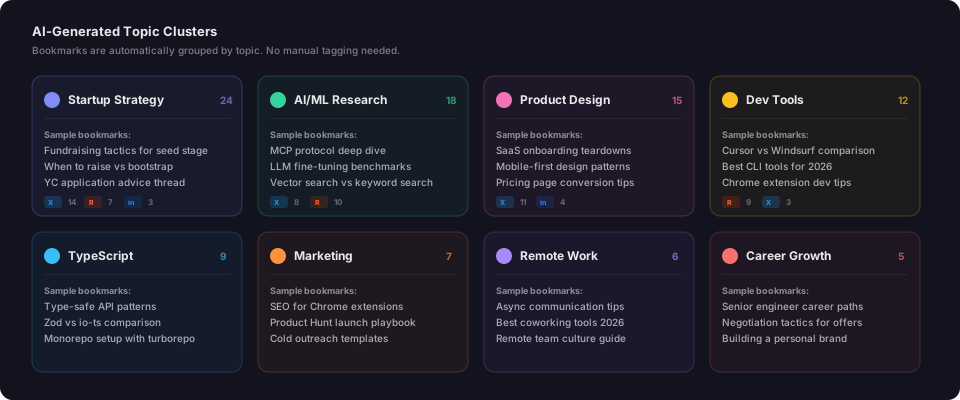
Topics are assigned automatically at save time. Your LinkedIn posts land in the same searchable knowledge base as your X and Reddit bookmarks, with no manual tagging.
The feature with no equivalent on this list is the MCP endpoint for Pro users. Connect ContextBolt to Claude Desktop, Cursor, or Windsurf and your LinkedIn library becomes a live tool inside every AI conversation. The full guide to connecting bookmarks to Claude via MCP covers the config in detail. It is the only bookmark tool in the Claude ecosystem right now.
Where it falls short: the free tier covers 150 saves total across all platforms combined. If you have hundreds of existing LinkedIn saves and want a free, no-limits tool for LinkedIn only, PostDeck is the better starting point. The MCP feature also requires Pro.
- Semantic search across all saves, not just exact keywords
- AI auto-tagging with no manual work at save-time
- Covers X + Reddit + LinkedIn in one knowledge base
- MCP endpoint for Claude, Cursor, and Windsurf (Pro)
- Local-first storage, data stays on your machine
- Bulk import from LinkedIn official data export CSV
- Free tier capped at 150 saves across all platforms
- MCP requires Pro at $6/month
- No CSV export currently
Best for: Anyone using Claude, Cursor, or another AI tool who wants LinkedIn saves available as live context mid-conversation. Also the right pick if you save across X, Reddit, and LinkedIn and want one search layer for all three.
Pricing: Free up to 150 bookmarks across all platforms. Pro is $6/month for unlimited saves, cloud sync, and MCP access.
Verdict: If AI-powered recall is the priority, nothing else on this list comes close. If LinkedIn-only is your need and you don’t use AI tools day-to-day, start with a free option and revisit when that changes.
2. PostDeck
Best free, local-first optionPostDeck is a Chrome extension and web app that turns your LinkedIn saved posts into an organized workspace. The core features, keyword search, labels, folders, archive, and CSV export, are free and stored entirely in your browser. No external server ever sees your saves unless you choose to enable Pro sync for cross-device access.
The setup takes about a minute. Install the extension, open your LinkedIn Saved Posts page, click Import, and PostDeck scans your saves and stores them locally. From there you can apply custom labels, archive posts you’ve read, pin ones you’ll return to, and search by keyword across your entire saved list.
Search is keyword-based, not semantic. You’re matching words against post text, not searching by meaning. That’s fine for a few hundred saves. It starts to break down once you’re past 500 or so, when you can no longer remember the exact wording of every post. But for most people setting up their first proper LinkedIn save system, keyword search is a meaningful upgrade from the native chronological dump.
The local-first architecture is the real differentiator. Everything is stored in your browser by default. No data leaves your machine unless you enable cloud sync. For anyone who doesn’t want their LinkedIn save history sitting on a company’s server, that is a genuine feature, not just a checkbox.
- Core features fully free with no account sign-up required
- Data stays in your browser by default
- Labels, folders, archive, and pinning all included free
- CSV export available on the free tier
- Clean, purpose-built interface for LinkedIn saves
- Keyword search only, no semantic search
- LinkedIn only, no cross-platform coverage
- Cross-device sync requires a paid plan
Best for: LinkedIn-only users who want a free, privacy-first tool with proper search, labels, and CSV export without signing up for a subscription.
Pricing: Core features free. One-time payment for Pro sync (cross-device access). Check current pricing at postdeck.app.
Verdict: The best free LinkedIn-specific option on this list. If you’re not using AI tools and you only need LinkedIn saves organized and searchable, start here.
3. LinkedMash
Best for Notion and Google Sheets exportLinkedMash was built for one specific job: getting your LinkedIn saves into the tools you actually work in. Connect your LinkedIn account via OAuth, let it pull your full saved posts history, and export directly to Notion, Google Sheets, or Airtable. It also adds AI-generated summaries for individual posts and a labeling system for organization.
The Notion and Sheets integration is the thing nobody else on this list does well. If your knowledge management workflow runs through Notion, having LinkedIn saves automatically sync there removes a consistent friction point. No copy-pasting. No CSV import dance. The saves appear in your Notion database with title, author, and an AI summary alongside each entry.
The pricing is the honest problem. LinkedMash costs $99 per year for the full export feature. A 7-day free trial exists, but it’s capped at 20 saves, which doesn’t give you enough to properly evaluate whether the Notion sync works for your specific setup. For a tool that patches a gap LinkedIn created and refuses to fix, $99/year is a significant ask.
If your workflow genuinely runs through Notion and you save LinkedIn posts as part of your research or content curation, the price pays for itself quickly once you stop losing posts you intended to reference. If you’re not a Notion user, PostDeck or Dewey are better value for less.
- Direct export to Notion, Google Sheets, and Airtable
- AI summaries generated for individual posts
- Label and folder organization system
- Pulls full saved posts history in one sync
- $99/year for a gap LinkedIn should fix natively
- 7-day free trial limited to 20 saves, hard to evaluate properly
- No semantic search, only keyword and AI summaries
- LinkedIn only, no cross-platform coverage
Best for: Knowledge workers who use Notion or Google Sheets as their primary tool and want LinkedIn saves to flow there automatically without a manual import step each time.
Pricing: 7-day trial (capped at 20 saves). Annual plan at $99/year.
Verdict: Justified if Notion is your knowledge base and you save LinkedIn posts regularly for reference. Hard to justify otherwise. If you’re not a Notion user, start with PostDeck or Dewey instead.
4. Dewey
Best for cross-platform organizationDewey started as a Twitter bookmark manager and has expanded to cover X, Reddit, LinkedIn, and Bluesky. It’s the most established paid tool in the social-bookmarks space, with the richest feature set for manual organization across platforms.
For LinkedIn specifically, Dewey gives you fast keyword search across your saves, lets you tag posts with custom labels, and backs up post content so your saves survive even if the original post gets deleted or the author removes it. That content backup is genuinely useful for anyone saving posts for research, citation, or competitive tracking. A screenshot isn’t enough when you need to cite the actual text.
The limitation is the one every manually organized system hits: there’s no AI tagging and no semantic search. You’re finding things by the exact words you remember, and you’re maintaining your own tag system across potentially thousands of posts. That’s a discipline most people don’t maintain past the first month. The full explanation of why keyword-only systems break at scale covers this in detail.
If you’re a researcher or content curator who is disciplined about manual tagging, Dewey’s cross-platform coverage and export options make it the strongest paid alternative. If you’re not rigorous about tagging, you’ll end up with a keyword-searchable mess rather than a useful knowledge base. The tool rewards discipline. It doesn’t substitute for it.
- Cross-platform: X + Reddit + LinkedIn + Bluesky in one archive
- Backs up post content so saves survive deletion
- Manual tagging and folder organization system
- CSV and Google Sheets export
- Fast keyword search across all saves
- No free tier
- No semantic search
- Manual tagging required for proper organization
- No MCP integration
Best for: Researchers, journalists, and content curators who save across X, Reddit, and LinkedIn and want a cross-platform archive with content backup and manual organization.
Pricing: Paid only. Approximately $5/month or $50/year. Verify current pricing at getdewey.co.
Verdict: The strongest cross-platform alternative if manual control and content backup matter more than AI recall. For AI-powered retrieval, ContextBolt is a better fit at a lower price.
5. LinkedIn Saved Post Hero
Best for minimal setup, freeLinkedIn Saved Post Hero is a free Chrome extension that overlays basic tag, filter, and keyword search directly onto your LinkedIn Saved Posts page. Install it from the Chrome Web Store, visit your saved posts, and a panel appears alongside LinkedIn’s native interface.
No account sign-up. No OAuth connection. No monthly fee. Your saves are pulled from your active LinkedIn session and processed locally. You can add custom tags to individual posts, filter by tag, search by keyword across your full saved list, and export everything to JSON or CSV. The extension is actively maintained with updates through 2026.
It’s not a deep tool. There is no semantic search, no cross-platform support, no Notion integration. What it does is the minimum viable upgrade from “unsearchable chronological dump” to “I can find things by keyword and tag.” For someone who hasn’t committed to a paid tool, that’s a meaningful jump for zero cost.
One honest limitation: because it processes your current LinkedIn session, it only works while you’re logged in and visiting the saved posts page. It doesn’t run in the background or auto-sync new saves. But for basic search and tagging across an existing library, it gets the job done without anything more complicated than a Chrome extension install.
- Completely free, no account needed beyond LinkedIn
- Works directly on the LinkedIn saved posts page with no setup
- Custom tags and keyword search included
- JSON and CSV export in one click
- Data processed locally, not sent to an external server
- Keyword search only, no semantic search
- LinkedIn only, no cross-platform support
- Requires visiting the saved posts page to sync, no background capture
Best for: Users who want the fastest possible upgrade to LinkedIn’s native saved posts with no cost, no subscription, and no account setup.
Pricing: Free. No paid tier.
Verdict: The right starting point if you want something working today at no cost. Move to PostDeck, Dewey, or ContextBolt when you need export options, cross-platform coverage, or AI-powered recall.
How to choose the right LinkedIn saved post tool for you
Pick the line that sounds most like your situation.
- If you use Claude, Cursor, or another AI tool day-to-day, pick ContextBolt. Your LinkedIn saves become live context inside your AI conversations via MCP. Nothing else on this list does that.
- If you want a free tool and privacy matters to you, pick PostDeck or LinkedIn Saved Post Hero. Both store everything locally with no external server. PostDeck has more depth; LinkedIn Saved Post Hero is faster to get started with.
- If your knowledge workflow runs through Notion, pick LinkedMash. The automatic Notion sync is the one thing it does better than everyone else.
- If you save across X, Reddit, and LinkedIn and want one search layer, pick ContextBolt or Dewey. ContextBolt gives you semantic search and MCP. Dewey gives you more manual control and content backup.
- If you’re a researcher or journalist who needs deleted-post backup, pick Dewey. The content archiving feature is the deciding factor for citation work.
- If you just want something working in the next five minutes at no cost, install LinkedIn Saved Post Hero now and evaluate the paid options once you know what you need.
The thing nobody says about LinkedIn saves
LinkedIn has had the save feature since at least 2019. In that time, the platform has added AI writing assistants, collaborative articles, a jobs board redesign, and multiple feed algorithm changes. The saved posts feature has stayed exactly the same: a chronological list with two tabs and no search.
That tells you exactly how LinkedIn prioritizes the feature. Saves don’t drive ad revenue or platform engagement metrics. They’re utility, and utility doesn’t get product investment unless it supports the core business model. LinkedIn’s own help documentation on saved posts hasn’t changed in years, which is the clearest signal you’ll get about where the feature sits on their roadmap.
The five tools on this list exist because LinkedIn created a gap and left it open. Every one of them is a workaround for something a platform with hundreds of millions of users could fix in a single sprint.
If you’re saving more than a handful of posts a month, that gap is already costing you. Not in money, but in the compounding loss of knowledge you intended to keep. Every post you saved and can’t find again is a decision made with less information than you had available.
Pick one tool today. The longer you wait, the larger the unsearchable backlog grows. And unlike Reddit’s 1,000-save cap, LinkedIn doesn’t limit how many posts you can save, so the list will just keep growing quietly until you do something about it.